 Ting Chen
Quick Navigation
You just landed in China. Jet-lagged, phone battery at 20%, and the taxi queue looks like a marathon start line. You open the Didi app — but it's all in Chinese.
I've been guiding groups in China for years, and this moment happens to almost every first-time visitor. The good news? Didi has a full English version. The bad news? Most tourists don't know how to find it. Let me walk you through it, step by step, so you never get stuck at an airport curb again.
Why Didi Matters for Foreigners
Uber doesn't work in China. Taxis on the street often don't speak English and may refuse short trips. Didi is the only reliable way to get around — over 500 cities covered, cars arrive in 2-5 minutes, and you pay through the app. But the catch: you need to set it up properly before your trip.
Setting Up Didi in English
Step 1: Download the App
Search for “DiDi Rider” on the App Store or Google Play. Don't confuse it with “DiDi Chauffeur” (that's for premium service). The icon is orange with a white “D”.
Step 2: Switch to English
Open the app. If it shows Chinese, tap the profile icon (bottom right) → Settings (gear icon) → Language → Select “English”. Important: This setting sometimes resets after app updates. I always check before my first ride of the day.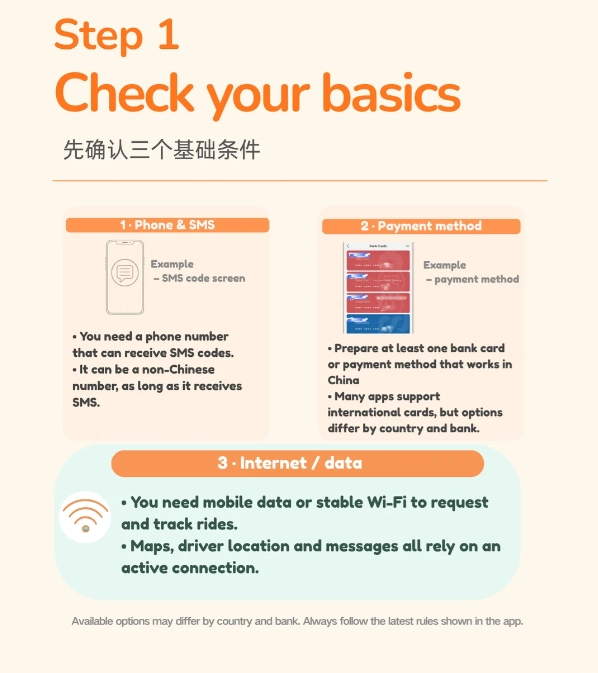
Step 3: Register with Your Passport
Didi requires real-name verification. For international users, you must use your passport. Tap “Register” → enter your phone number (if you have a Chinese SIM, use that; otherwise, you can use your international number but expect extra steps). Then upload a photo of your passport data page. This verification can take a few hours — do it at least a day before you need a ride.
Payment Methods That Actually Work
Didi accepts Alipay, WeChat Pay, and international credit cards (Visa, Mastercard). But — and this is a big but — the international card option is hidden and sometimes glitchy.
| Payment Method | Setup Difficulty | Reliability | Notes |
|---|---|---|---|
| Alipay (Tourist Version) | Easy | High | Can link international card; widely accepted |
| WeChat Pay | Medium | High | Requires Chinese bank card for full function; limited for foreigners |
| International Credit Card | Hard | Low to Medium | Often fails; must be added within the app under Wallet → Payment Methods |
| Cash (Pay Driver Directly) | Easy | Medium | Some drivers may not have change; select “Cash” as payment in app |
My recommendation: Set up Alipay's tourist version (comes with a temporary virtual card). Link your Visa or Mastercard to Alipay, then pay Didi through Alipay. This worked for 90% of my guests. If Alipay fails, keep 100-200 RMB in small bills for emergencies.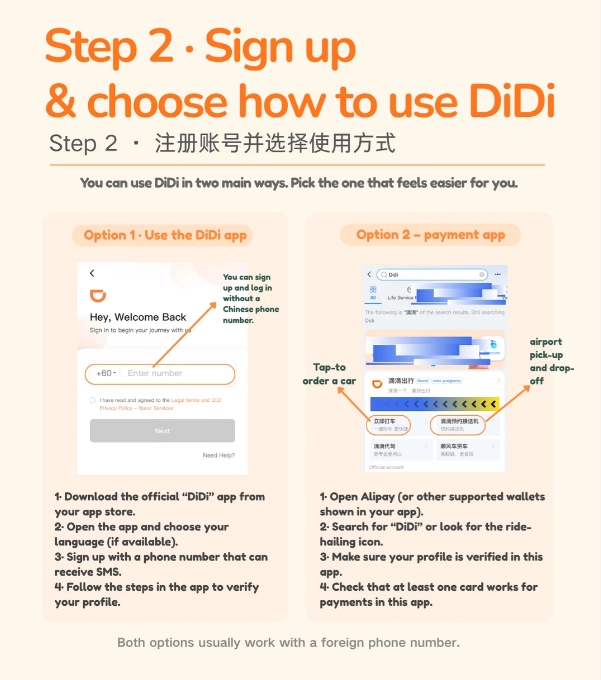
Navigation: Skip Google Maps
Google Maps is blocked in China. Even with a VPN, its map data is outdated and often points to wrong locations. Instead, use Apple Maps (works surprisingly well for English speakers) or Baidu Maps with an English interface (switch language in settings).
When you set a destination in Didi, you can type an address. Always have your destination written in Chinese characters — drivers don't read English. I keep a note on my phone with key places in Chinese (e.g., “上海浦东机场T2” for Pudong Airport Terminal 2). You can also copy addresses from Trip.com or your hotel confirmation email.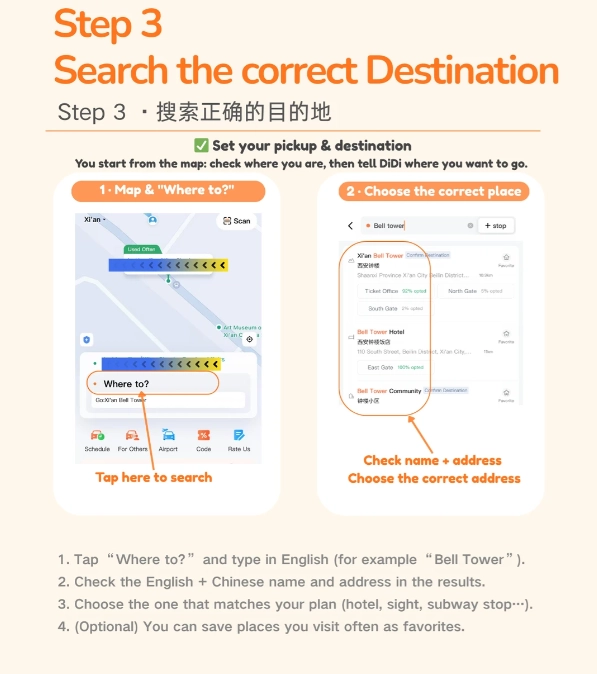
Real World Scenario: Arriving at Pudong Airport
You deplane at Shanghai Pudong (PVG). Follow signs to the taxi waiting area. But instead of joining the long queue, open Didi. Switch to English. Your location is detected automatically (thank goodness). Type “上海外滩华尔道夫酒店” in the destination field. The app shows estimated fare: 180-220 RMB (way cheaper than the fixed airport taxi rate of 250+).
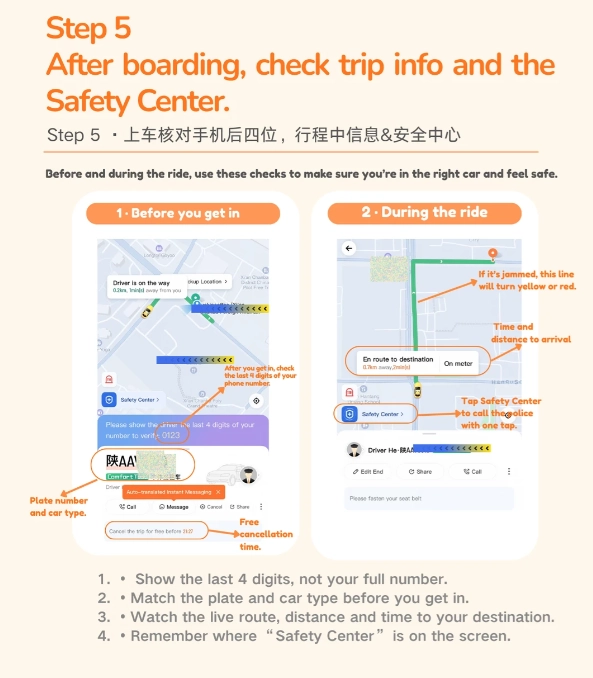
Select “Express” — the standard option. A driver accepts within 30 seconds. License plate number and car model appear. Walk to the designated pick-up point (zone 30 on the map). The driver calls you — but you don't speak Chinese. No problem: Didi has an in-app chat with auto-translate. Type “I'm at Gate 5, wearing a red backpack.” The driver sees it in Chinese.
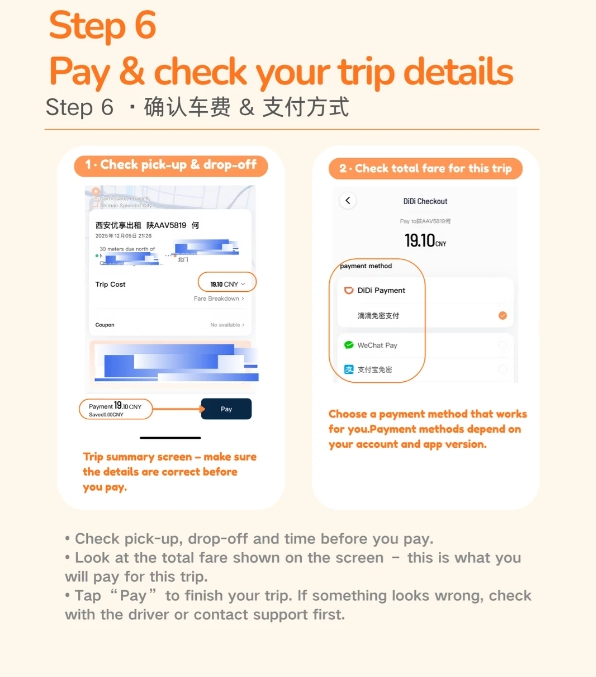
Payment: The app deducts from your linked Alipay automatically. You don't even need to take out your wallet.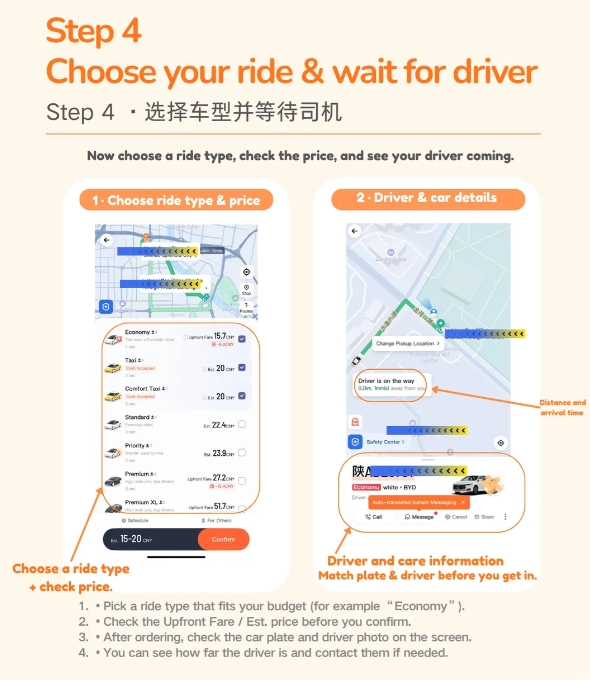
Common Pitfalls & How to Avoid
- Registration stuck: If passport verification fails, try turning VPN off and on. Or use the “Customer Service” chat in the app (they have English support, but response can be slow). Alternative: ask your hotel front desk to help.
- Driver cancels: Sometimes drivers cancel if they see the pickup is at a hotel (they prefer longer trips). Wait a few seconds and rebook. Or select “Premier” (higher fare, less cancellation).
- Wrong drop-off: Always confirm the exact building name. For example, if you're going to the Forbidden City, drop-off should be “Meridian Gate”, not the south gate entrance.
- No network: Buy a local SIM card at the airport. China Mobile, China Unicom, or China Telecom all work. For short trips, use an eSIM from Airalo or Holafly (data only, but you can use VoIP for calls).
Frequently Asked Questions
 Is it safe to use Didi at night as a solo female traveler?
Verified and fact-checked by the editorial team. This content has been fact-checked to ensure informational precision.








No comments yet.