 Bo Wu
Bo Wu
What's Inside
I once watched a family miss their bullet train to Xi'an because the screen said “No tickets available.” But it wasn't sold out — the language setting was wrong. That's the kind of headache 12306 can cause if you don't know the tricks. Forget Google Maps (it barely works in China). Bring Apple Maps or Amap (高德地图) in Chinese. And here's the raw truth: if you're not patient with Chinese interfaces, skip 12306 and use Trip.com directly. But if you want to book directly (save a bit of cash and learn the system), I'll walk you through every step with the exact pitfall to avoid.
Why 12306 Is Tricky for Foreigners
The official China Railway website, 12306.cn, has an English interface — but it's hidden. Most foreigners land on the Chinese page and panic. Even after switching to English, some pages remain partially in Chinese. The verification system (CAPTCHA) is infamous: selecting the correct images of “bicycles” or “traffic lights” feels like a test. And payment? International credit cards are rejected 90% of the time. You'll need Alipay or WeChat Pay linked to a foreign card.
Step 1: Passport Registration & Verification
You can't book without an account. Here's how to create one as a foreigner: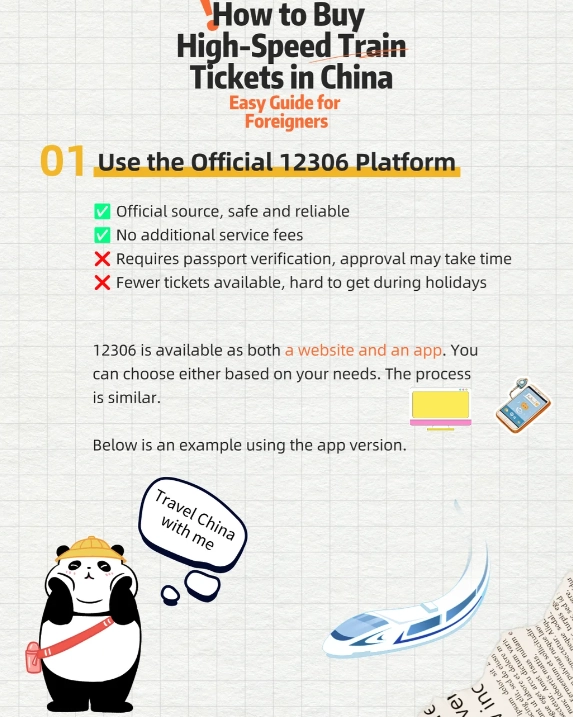
- Go to 12306 English Page
- Click “Register” and fill in your name exactly as on your passport. No middle names if your passport doesn't show them — this causes verification failure later.
- Passport type: select “Other” or “Foreign Passport.” The system often asks for passport number without spaces.
- Phone number: If you don't have a Chinese SIM, you can use a foreign number — BUT you won't receive SMS verification needed for some actions. I recommend getting a Chinese SIM at the airport (China Mobile, China Unicom). It costs about 100 RMB for a prepaid plan.
- Verification: After registering, your account is “unverified.” To verify, you must go to a train station ticket office with your passport. Yes, seriously. Find any major station (even small ones work). The staff will scan your passport and link it to your account. After that, you can book online.
Step 2: Search, Select & Book the Right Train
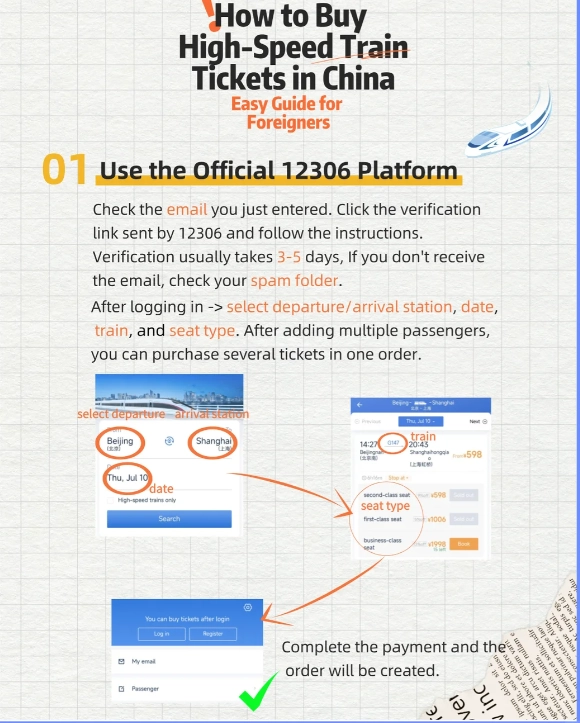
Once your account is verified, log in on the English site. Enter your departure and arrival cities. The system uses pinyin (e.g., Beijing, Shanghai Hongqiao). Pay attention to station names: Shanghai has 3 major stations — Shanghai Hongqiao (虹桥) for high-speed, Shanghai Railway Station (上海站) for slower trains, and Shanghai South (上海南). The English interface often uses “Shanghai” for the central station, which can be wrong.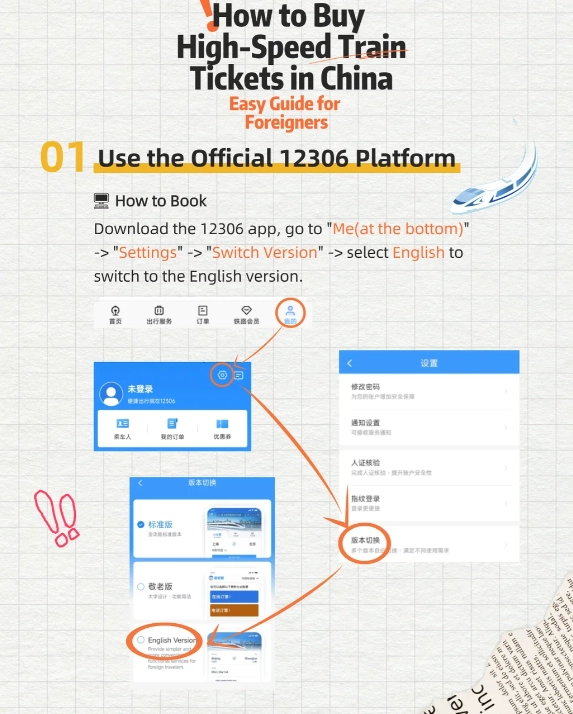
| Train Type | Seat Classes (En) | Price Range (2nd class, 北京–上海) |
|---|---|---|
| G (High-speed) | Second class, First class, Business | 550–1750 RMB |
| D (Bullet, slower) | Second class, First class, Sleeper | 310–800 RMB |
| K (Regular) | Hard seat, Soft seat, Sleeper | 160–500 RMB |
Select your train, then click “Book Now.” You'll need to add passengers — use the same passport number as during registration. For children under 1.2m, ticket is free but no seat; 1.2–1.5m half price.
Dealing with the CAPTCHA
The image verification is notorious. If you fail 3 times, you're locked out for 15 minutes. Here's my trick: refresh the captcha until you get an easy one (e.g., “bicycle” instead of “tricycle”). Use the “Refresh” button next to the image. On mobile, it's harder; I recommend using a desktop browser on 12306.
Step 3: Payment – The Biggest Headache
12306 accepts: Alipay, WeChat Pay, UnionPay, and some Chinese bank cards. International Visa/Mastercard? Almost never. I've seen it work for some users with Visa via the “Pay with Alipay” option (Alipay linked to a Visa card), but it's unreliable.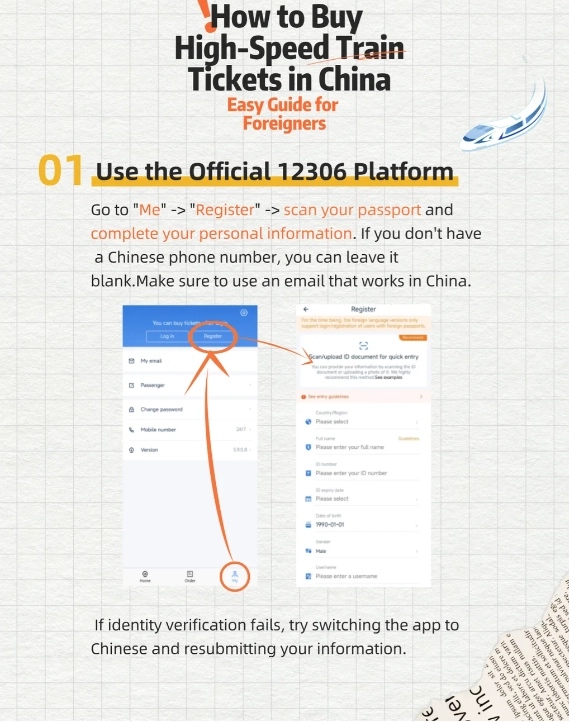
After successful payment, you'll get an order number and a QR code. Screenshot it — you'll need it to collect the paper ticket.
Step 4: Collecting Your Ticket at the Station
Even for e-ticket eligible trains, foreigners must get a paper ticket. Go to the ticket office (售票处) with your passport and order number. Look for the “取票” (collect ticket) machine — but these machines only accept Chinese ID cards. So you must queue at the manual counter. Trust me, I've tried the machine with my passport — it doesn't work.
- At the counter: hand over passport and say “Wǒ yào qǔ piào” (I want to collect my ticket). Staff will print it.
- Cost: Free.
- Time: Allow 20–30 minutes in line. Peak hours (7:00–9:00, 17:00–19:00) are crowded.
- Some stations have a “Foreigner Window” — but rarely. Ask the queue coordinator.
The Easier Backup: Trip.com (and When to Use It)
Let's be real: 12306's English experience is clunky. If you value your time, use Trip.com's train booking service. They charge a small service fee (10–20 RMB per ticket) but handle everything: registration, payment with international cards, and even e-tickets that work with passport (no paper collection needed on many routes).
| Feature | 12306 Direct | Trip.com |
|---|---|---|
| Payment with intl card | Rarely works | Always works (Visa, MC, Amex) |
| Paper ticket needed | Yes (most cases) | No (e-ticket accepted) |
| Customer support in English | None | 24/7 chat |
| Price | Base fare | Base fare + service fee |
When to use 12306 directly: If you're here for a long stay, have a Chinese bank account or reliable Alipay, and want to save the service fee. For a short trip with tight schedule, just use Trip.com.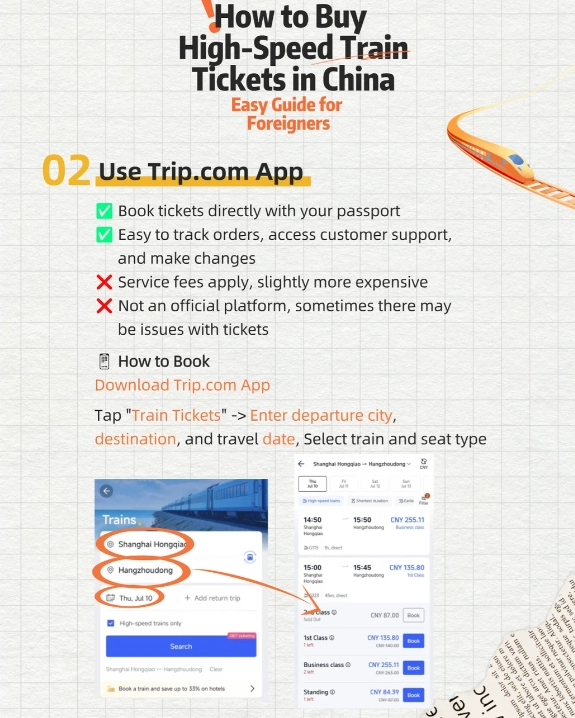
FAQ – Your Questions, Answered
Verified and fact-checked by the editorial team. This content has been fact-checked to ensure informational precision.






Absolutely golden! I’ve been using 12306 with Chinese interfaces for years and this English guide is better than any official translation. The author even includes workarounds for common glitches like the captcha not loading. I rebooked my ticket after reading the change policy section and saved nearly $15 on rebooking fees. My friends who don’t read Chinese now use this as their go-to. Can’t recommend enough—well worth bookmarking.
I was expecting more nuance for experienced travelers. The guide is very beginner-friendly, which is great, but it glosses over common issues like when your name contains a middle initial or how to handle a lost confirmation email. I followed it step by step and still ran into an error message when checking in at the station—the staff had to help me manually. Not terrible for a free resource, but it left me a bit frustrated. Would’ve liked troubleshooting tips.
This guide is a lifesaver! I’m an English-only speaker traveling solo and was really nervous about the Chinese railway system. The author breaks down every click, even the tricky parts like choosing seat preferences and handling waitlisted tickets. I booked two trips (Xi’an–Chengdu and Chengdu–Guangzhou) perfectly. The section on refunds and exchanges was also crystal clear. Honestly, I don’t think I could have done it without this. 5 stars all the way.
Helpful but a bit outdated in spots. The guide covers the basics well, like registering an account and linking your phone number. I used it last week and managed to book a high-speed ticket from Beijing to Shanghai without issues. However, the payment section didn’t explain the foreign card processing delays clearly enough—my Visa took three attempts before going through. Good starting point, just double-check the latest policies elsewhere.
I followed this guide for my first China train booking and honestly, it saved me a ton of time. The step-by-step screenshots were super clear, especially the part about filling in passport numbers. The only thing I’d knock a star for is that it didn’t mention the visa verification pop-up that appears when you’re a foreigner—I got stuck there for 15 minutes. Still, way better than guessing on my own. Highly recommend for anyone new to the system.