 Ming Yang
What You'll Learn Here
You just landed in China. Jet-lagged. Your hotel room has no kettle. You need one, now. The front desk shrugs. But Taobao can deliver it in two hours — if you can navigate it in Chinese. That’s the wall most foreigners hit. I’ve helped dozens of travelers break through it. Let me show you how to use Taobao in English, step by step.
1. Setting Up Your Taobao Account in English
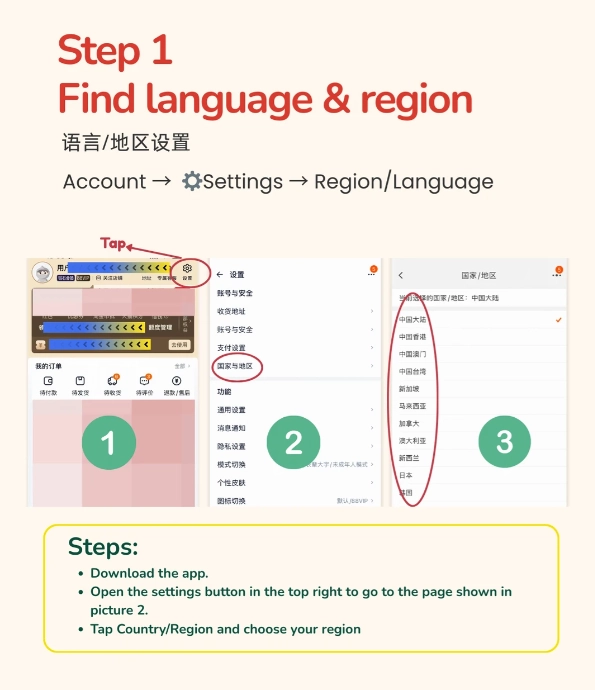
First, you need a Taobao account. The registration page has an English option, but it's tricky. Here's the exact flow:
- Download the Taobao app (iOS App Store or Android, you might need to switch region to China). Or visit taobao.com.
- Tap 注册 (Register). Look for the language switch at the top right — it's often a small globe icon. Select English.
- Enter your email or international phone number. I recommend using your email first; phone verification sometimes fails for non-Chinese numbers.
- You'll receive a verification code. If using a phone number, add your country code manually (e.g., +1 for US).
- Set a password. Then you're in — but with limited features. To unlock everything, you need real-name verification.
Pro tip: Use your hotel address as the default shipping address during setup. You can change it later. This avoids address format errors.
2. Navigating the Taobao App with English Settings
Taobao's interface is mostly Chinese even after switching to English. Don't panic. The English option translates main menus but product pages stay Chinese. Here's what each key button does:
| Chinese Text | English Meaning | What to Do |
|---|---|---|
| 首页 | Home | Browse recommendations |
| 搜索 | Search | Type keywords (use product names in English or paste Chinese characters) |
| 购物车 | Cart | View items you added |
| 我的淘宝 | My Taobao | Orders, account settings |
| 立即购买 | Buy Now | Proceed to checkout |
| 加入购物车 | Add to Cart | Save for later |
To search in English, use generic terms like “portable kettle” or “phone case.” Taobao's search algorithm will show results with matching product titles. If you know the Chinese word, paste it — results improve drastically. I always tell my clients to use Google Translate to get the Chinese equivalent and copy-paste it into Taobao's search bar.
Another trick: use the image search function (camera icon in the search bar). Upload a photo of the item you want — Taobao finds visually similar products. This is a lifesaver when you don't know the name.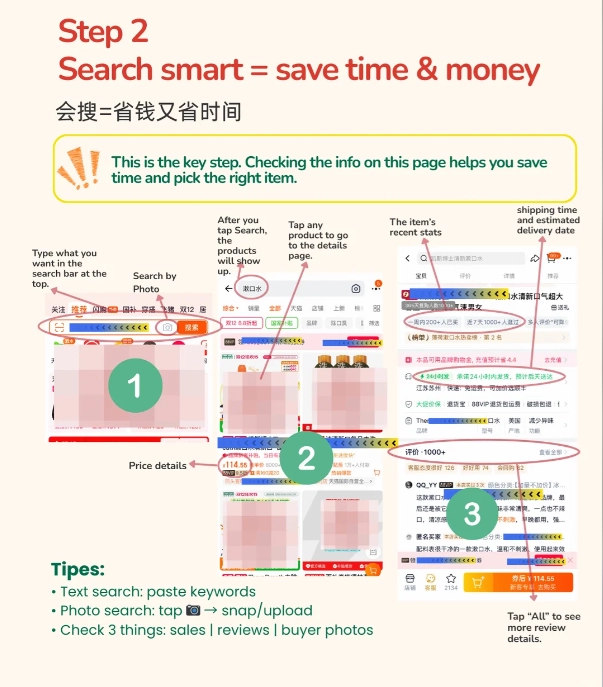
3. Paying on Taobao: International Cards and Alipay
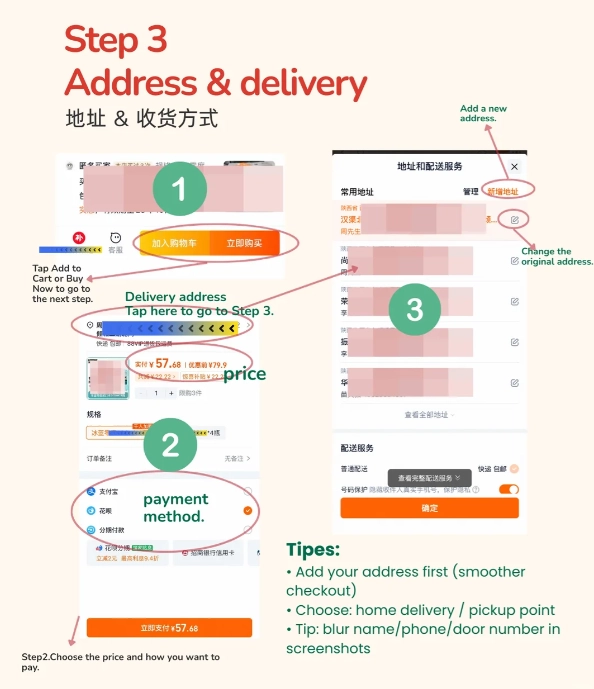
This is where most people get stuck. Taobao does not directly accept international credit cards. You need Alipay. But don't worry — Alipay now supports linking foreign Visa, Mastercard, or JCB cards. Here's how:
- Download the Alipay app and register with your international phone number.
- Go to Me > Payment Settings > Add a Card. Enter your international card details.
- Alipay will charge a small amount for verification (refunded later).
- Once linked, when you pay on Taobao, choose Alipay as the method, then select your international card.
Cash is not an option for Taobao. Most convenience stores also accept Alipay, but for online orders, digital payment is the only way.
4. Finding Products and Communicating with Sellers
After you search and find a product, you'll land on the product page. Key sections to look at:
- Price & variations: Often listed as 颜色 (color), 尺寸 (size). Use Google Translate or just guess based on icons.
- Buyer ratings: Look for a score above 4.8. Read reviews — even if you can't read Chinese, the photos are useful.
- Shop reputation: Click the shop name. Check its 描述相符 (description match), 服务态度 (service attitude), and 物流速度 (logistics speed). All should be above 4.7.
Need to ask the seller a question? Click 联系客服 (Contact Customer Service). A chat window opens. Type in English — many sellers have translation tools, but it's hit or miss. Stick to simple English and numbers. Example: “Hello, this product, ship to USA? Cost?” Expect slow replies and occasional confusion.
Better approach: avoid communication. Choose products that clearly state international shipping in the title (look for “海外发货” or “overseas shipping”). Or use the global version of Taobao called Taobao World (though it has fewer items).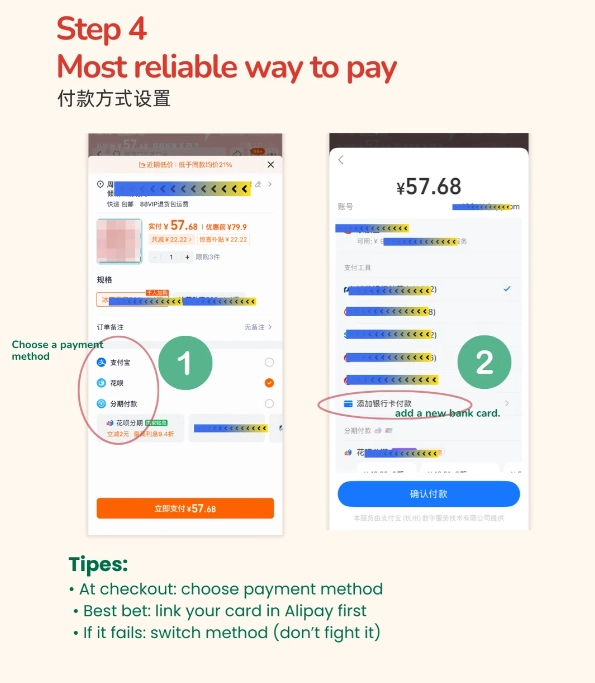
5. Shipping and Customs: Getting Your Items Abroad
Most Taobao sellers only ship within China. To send items abroad, you have two paths:
| Method | Pros | Cons |
|---|---|---|
| Direct international shipping (if available) | Simple, but few sellers offer it | Expensive, slow, limited item selection |
| Use a freight forwarder | You can consolidate multiple packages; cheaper per kg | Need to create an account; extra step |
I always recommend a freight forwarder. Chinese companies like Superbuy, CSSBuy, or YOYbuy give you a Chinese warehouse address. You buy items, have them delivered to that warehouse, then pay the forwarder to repack and ship internationally. They handle customs paperwork. Typically costs $10-30 for a small package to the US, and delivery takes 7-14 days.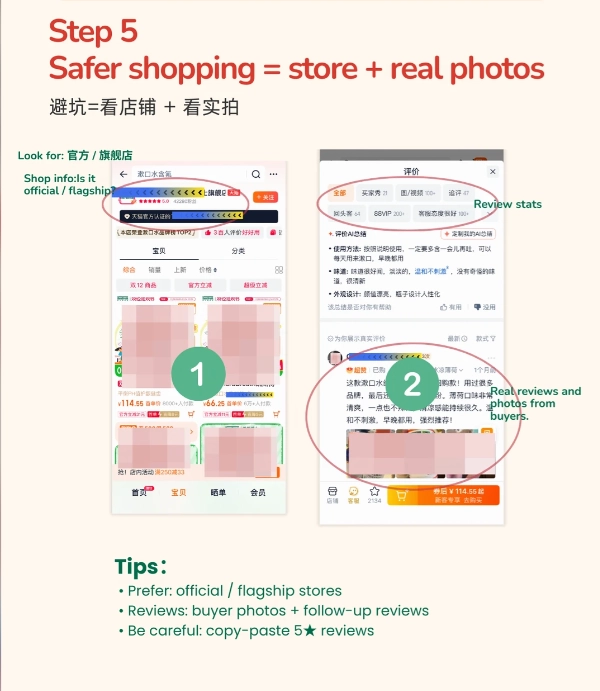
6. Common Mistakes (Even I Made These)
Here are the screw-ups I've seen from tourists and newbies. Skip these:
- Using the wrong address format: Chinese addresses go from province down to street. Don't copy your Western format. Write: province, city, district, street, building, room number. Example: Zhejiang Province, Hangzhou City, Xihu District, 100 Xueyuan Road, Building A, Room 501.
- Paying before verifying the seller: Scammers exist. Check shop ratings and buyer reviews. If a deal looks too good (like a $20 iPhone case that normally costs $50), it's probably fake.
- Ignoring the return policy: Returning items to China is a nightmare. Most sellers don't accept returns for international buyers. Accept that risk or buy cheap items.
- Choosing the wrong shipping option: When using a forwarder, select economy air (about 15-20 days) unless you're in a rush. Express (DHL, FedEx) is 3-5 days but costs triple.
One more thing: the Taobao app can fake your location. If you set your location to the country you're shipping to, some products become unavailable. Keep your location as a Chinese city (e.g., Shanghai) for the full catalog. Change it back when you check out with the forwarder address.






No comments yet.