 Su Lin
What's Inside
I've lost count of how many groups I've rescued from airport Wi-Fi hell. They land in Beijing, pull out their phones, and — nothing. Google Maps lies. WhatsApp won't send a single voice note. Their international roaming plan promised “unlimited” but in China it's either throttled or blocked. That's the moment they start searching for a china tourist sim card.
Let me cut the confusion right here: the only reliable way to stay connected is a local prepaid SIM from China Mobile, China Unicom, or China Telecom. Or, if your phone supports eSIM, a china travel esim from a provider like Airalo or Nomad. But each has its own quirks — and you need to know them before you board that plane.
Why You Need a Dedicated SIM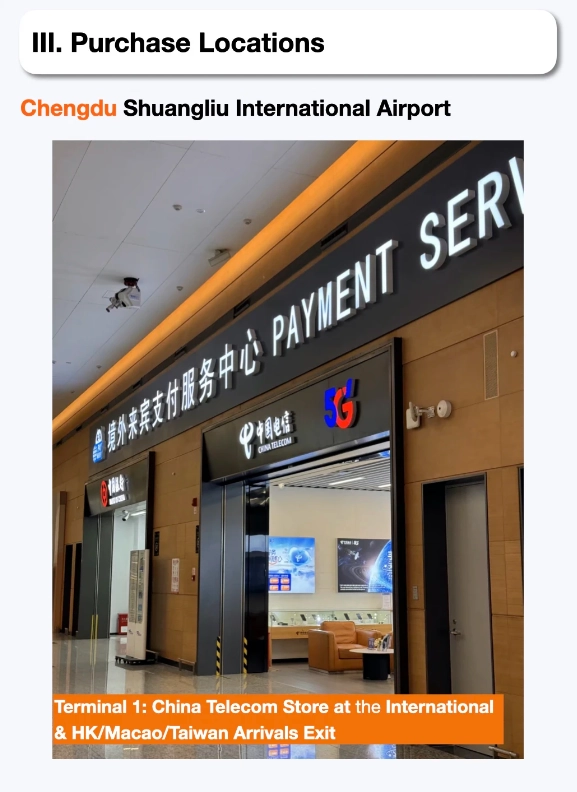
Many tourists think their home carrier's international roaming will work. It might, but then they hit the Great Firewall. Without a VPN (which I'll cover below), Facebook, Instagram, Google, and WhatsApp are blocked. Even if roaming works, speeds are often terrible because your signal gets routed back to your home country. A china tourist sim card gives you a local IP, which means uncapped speed and — with a good VPN — full internet access.
Three SIM Options Compared
Here's the truth: there's no perfect SIM for everyone. You have to pick based on your phone, length of stay, and data needs.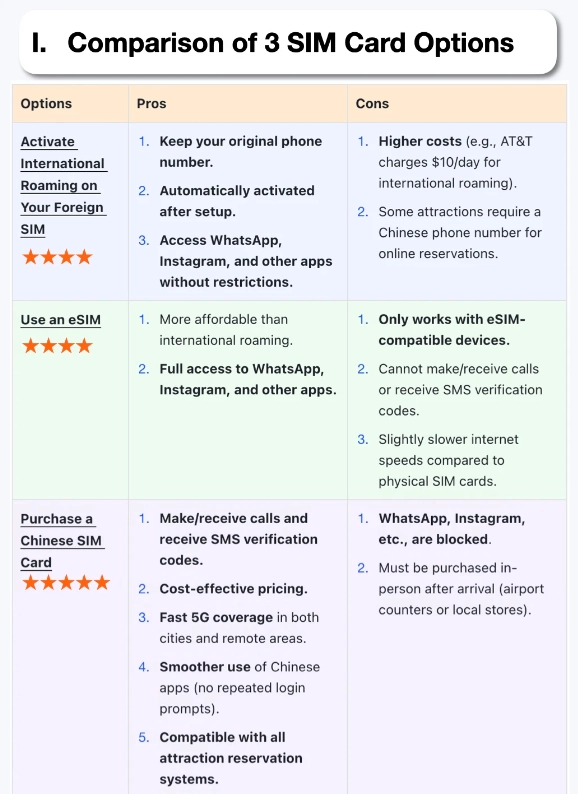
| Option | Pros | Cons | Best For |
|---|---|---|---|
| Physical SIM (airport counter) | Stable, cheap (~$20 for 15 days), easy activation | Need to queue; your home SIM slot is occupied | Most travelers, especially beginners |
| eSIM (like Airalo, Nomad) | No physical swap, can keep home number active, buy online before you fly | Must have eSIM-compatible phone (iPhone XS+, Samsung S20+, etc.); data only, no Chinese phone number | Tech-savvy, short trips, dual-SIM users |
| Pocket Wi-Fi rental | Unlimited data for multiple devices, no SIM fiddling | Heavy, need to charge daily, return hassle | Groups of 3+, families |
Where to Buy a Tourist SIM
You have three main spots:
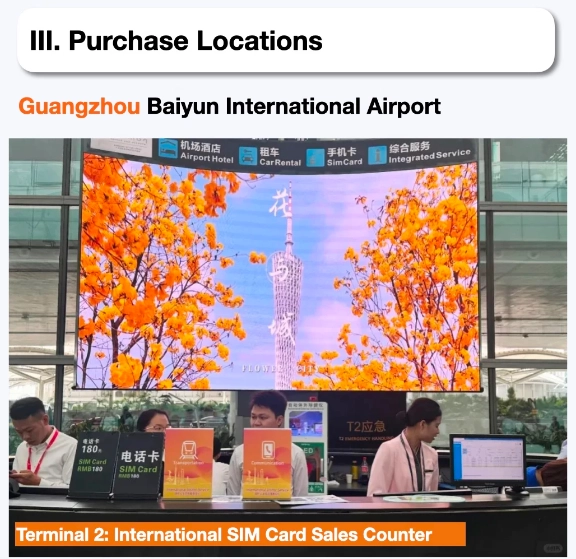
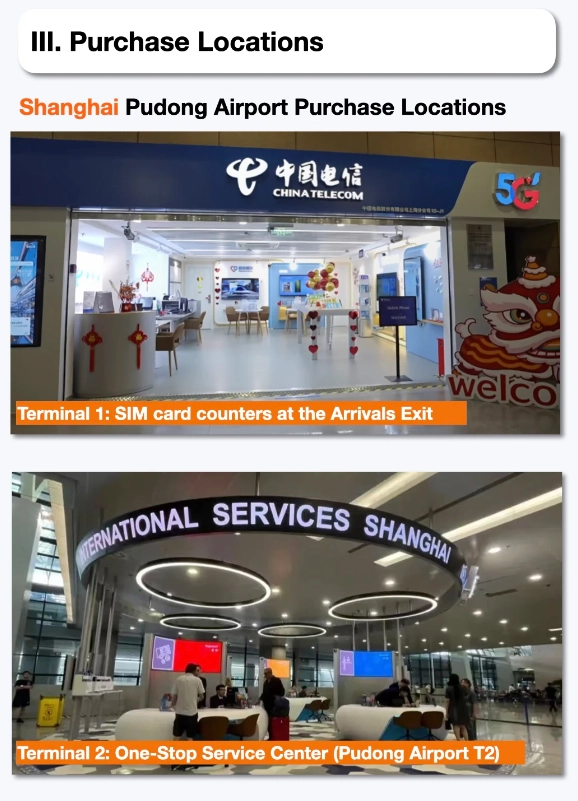
- Arrival hall of major airports (Beijing Capital, Shanghai Pudong, Guangzhou Baiyun, etc.) — look for the official counters of China Mobile, Unicom, or Telecom. They have English leaflets and staff who deal with foreigners daily. Bring your passport. Total time: 10–15 minutes.
- Online before departure — sites like Trip.com or Klook sell tourist SIMs that you pick up at the airport or have delivered to your hotel. I always recommend pre-ordering if your flight arrives late; counters may be closed after midnight.
- China Unicom flagship stores in city centers — but you'll need a local address for registration. Hotels can help. I'd stick to the airport for simplicity.
Activation and VPN Essentials
Getting the SIM is only half the battle. Activation is usually instant (they slide it in for you). But here's the kicker: the SIM comes with a Chinese IP, which means Google, YouTube, Instagram, and WhatsApp are all blocked unless you have a VPN.
Set up your VPN before you leave home. I personally use ExpressVPN or NordVPN — both work reliably in China. Download the app and buy a subscription while you still have unrestricted internet. Once you land, switch on the VPN, and you're good.
Pro tip: Some tourist SIMs offer a free trial of a built-in VPN (like China Unicom's “Hong Kong-return” plan). It's slow. Don't rely on it. Bring your own VPN.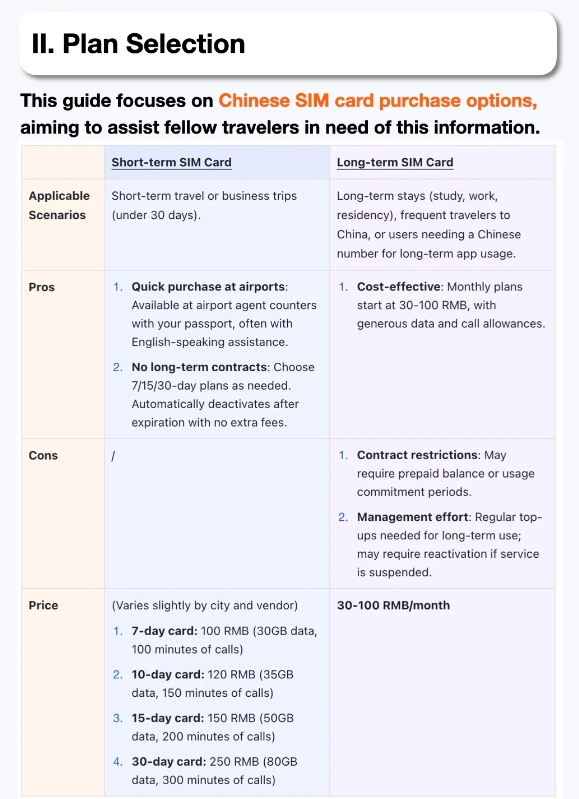
Top 3 Mistakes Tourists Make
I see these every single month:
- Buying a SIM from a random shop in the city. Some small shops sell “international SIMs” that stop working after 3 days. Only buy from official carrier stores or reputable online platforms.
- Not checking phone band compatibility. Older US phones (especially Verizon models) may not support Chinese 4G bands (Band 1, 3, 40). Check your phone's specs at frequencycheck.com before you go.
- Assuming the eSIM will give you a phone number. Most travel eSIMs are data-only. That means you can't receive SMS for app registration. If you need a number, get a physical SIM with voice/SMS capability.








This card turned my China trip from stressful to smooth. Ordered online before departure, picked it up at Beijing Capital Airport. Setup took 2 minutes. Used it for 3 weeks – no dropped calls, fast 5G in most metro areas, and the manual explains how to use VPNs if needed. Best $30 I spent. Never again paying roaming fees.
Got the 30-day unlimited plan. Coverage was great in cities but completely dropped out in rural parts of Yunnan (e.g., Tiger Leaping Gorge). Also, the eSIM QR code expired before I could scan it, so I had to buy a physical card at the airport – wasted 30 minutes. Once active, speeds were fine. Worth it for the price, but don’t expect rural coverage.
Honestly, I was skeptical after reading mixed reviews, but this SIM card exceeded expectations. Popped it in at Hongqiao station, and it worked immediately. Used it for 10 days in Shanghai, Hangzhou, and Suzhou – never lost signal even on high-speed trains. The 10GB package was more than enough for navigation, social media, and some Netflix. Would recommend to any solo traveler.
Decent card overall but the data throttle hit me hard after about 3GB in the first day (I was uploading photos and streaming). Speeds dropped to barely usable for maps after that. Fine for messaging and basic browsing, but if you’re a heavy user like me, go for the unlimited plan. Customer service was responsive on WeChat though.
Bought this SIM at Shanghai Pudong airport – activation was a breeze and I hit 4G instantly. Used it across Beijing, Xi’an, and Guilin. Google Maps, WeChat, and even video calls back home worked flawlessly. Saved me from the $20/day roaming fee my carrier wanted. Absolute lifesaver for a two-week trip.
I’m a photographer and needed reliable data for uploading raws to the cloud. This SIM delivered. In Lijiang and Dali, I got consistent speeds even during peak hours. The 30-day plan gave me more than enough GB. Only minor gripe: the SIM tray on my iPhone needed a paperclip to eject, but the card itself worked flawlessly.
As a solo traveler who constantly gets lost, this SIM card was a lifesaver. I used Google Maps and Dianping without any lag. Even streamed some music on the metro without buffering. The best part? No hidden fees—what you see is what you pay. I’m recommending it to everyone in my hostel.
Honestly, I was disappointed. The card worked fine in downtown Xi’an, but as soon as I went to the terracotta warriors site, the data slowed to a crawl. I ended up relying on the museum’s free Wi-Fi. Also, the activation instructions were confusing—had to watch a YouTube video to figure it out. Not the hassle-free experience I hoped for.
Got this SIM for a two-week trip across Guilin and Chengdu. Coverage was excellent in cities, but once I got into the rural mountains near Yangshuo, it dropped to 3G and sometimes disconnected. Customer service was helpful—replied to my WeChat message within an hour. Still, for mostly urban travelers it’s a solid choice.
I picked this up at the airport after a nightmare with my home carrier’s roaming. Setup was a breeze—just popped it in and it worked instantly. The 4G speed was solid even on the bullet train from Shanghai to Beijing. Used the 15-day plan and never had to hunt for Wi-Fi again. Absolutely worth every penny for peace of mind.