 Chen Liu
Quick Guide
Landing in China without Google Maps feels like losing a limb. I've watched dozens of tourists stare at their phones, helpless, as they realize the app they rely on back home is a blank grid here. The first time I brought a group, one guy spent 20 minutes trying to get a taxi because he couldn't show the driver a Chinese address. That's when you learn the hard way: you need a different mapping app for China.
Here's the truth: most guides tell you to download Baidu Maps or Amap, but they don't tell you how to actually use them as a foreigner. I'll walk you through the best mapping app for China, how to set it up in English, how to avoid the pitfalls, and even how to skip the registration nightmare. By the end, you'll navigate like you've lived here for years.
Why Google Maps Fails in China
Google Maps is blocked in China due to local regulations. Even if you have a VPN, the data is often outdated or misaligned because Chinese mapping services use a different coordinate system (GCJ-02). That means addresses can be off by hundreds of meters. I once tried to use Google Maps with a VPN to find a restaurant in Shanghai — it pointed me to a parking lot.
Additionally, Google Maps lacks real-time transit data for Chinese cities, no integration with Didi (the local Uber), and no offline maps that work reliably. So, for anything beyond a rough idea, it's useless.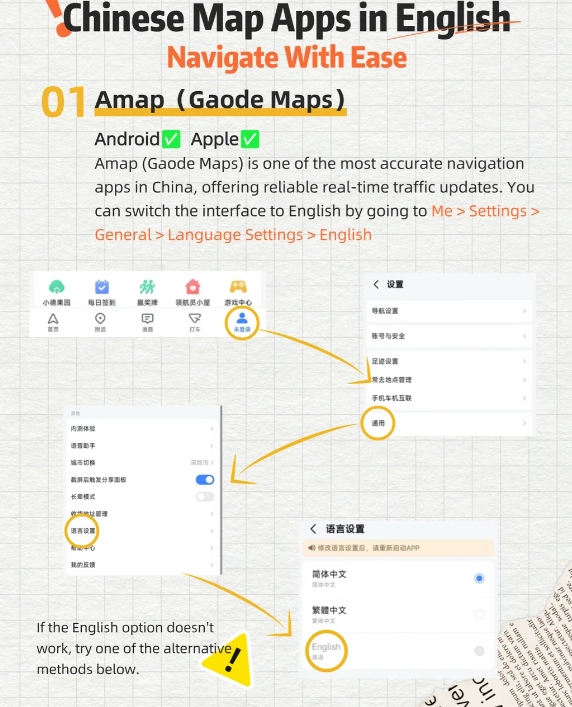
Top 3 Mapping Apps for China
After testing all options with clients, here are the three that actually work. I personally use Amap (高德地图) as my daily driver, but Baidu Maps has its strengths. Apple Maps is a decent backup if you have an iPhone.
| Feature | Amap (Gaode) | Baidu Maps | Apple Maps (China) |
|---|---|---|---|
| English interface | Partial (app menus in English, search still requires Chinese) | Partial (similar to Amap) | Full English (but limited search results) |
| Public transport | Excellent (real-time bus, subway, including exit numbers) | Excellent (slightly more detailed in some cities) | Good (uses Amap data for transit, but fewer options) |
| Offline maps | Yes (download city maps for free) | Yes (download city maps) | No true offline; cached areas work only temporarily |
| Didi integration | Built-in (can call a ride directly from the app) | Built-in (similar) | Not integrated |
| Voice navigation in English | Yes (set to English voice) | Yes (select English voice pack) | Yes |
| Price | Free | Free | Free |
My recommendation: Install Amap if you want the most reliable public transport and Didi integration. If you're in Beijing or Shanghai, Baidu Maps may have slightly more Points of Interest (POIs). For quick lookups in English, Apple Maps works surprisingly well when you search for landmarks (e.g., "Forbidden City") — it pulls data from Amap under the hood.
How to Set Up Amap or Baidu Maps in English
Here's the catch: both apps are primarily in Chinese. But you can switch the interface to English. Let me save you the frustration.
Amap (高德地图)
- Download from the App Store or Google Play (you need a Chinese App Store account for the official version; alternatively, use a third-party site like APKPure — but be careful with malware).
- Open the app, tap the profile icon (bottom right), then the gear icon (top right).
- Scroll down to "Language" (语言) and select "English". The menu will switch to English.
- For voice navigation, go to Settings > Navigation Settings > Voice and choose an English voice (like "English - US").
- To search locations, you must type in Chinese characters. Use a translation app (like Apple Translate) to convert English place names into Chinese. For example, "Tiananmen Square" → 天安门广场. Copy and paste into Amap.
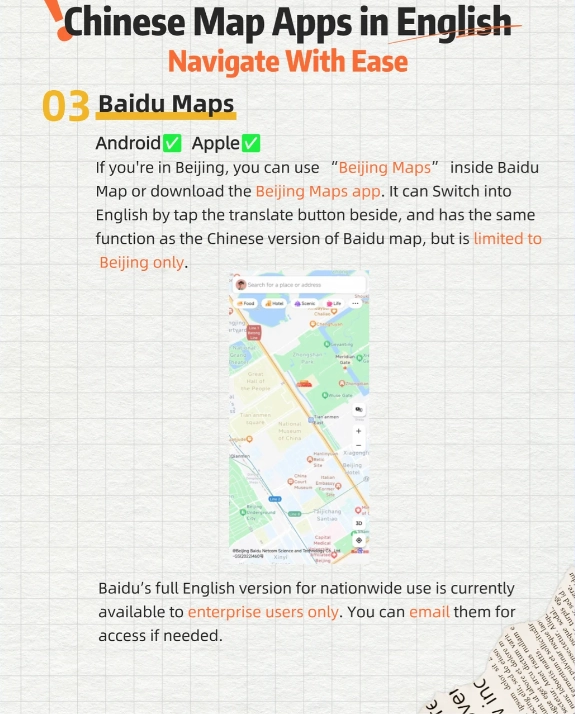
Baidu Maps (百度地图)
- Download from the App Store or Baidu's official site.
- Open the app, tap the avatar icon (top left), then the gear icon.
- Find "Language" and switch to English.
- For voice, go to Navigation Settings > Voice > English.
- Same trick: search using Chinese characters or use the built-in English search (it recognizes some English place names, but not reliably).
Navigation Tips for Foreigners
I always tell my clients: the number one mistake is relying on the app's English search. It's spotty. Instead, build a habit of keeping a list of Chinese addresses for places you plan to visit. Here's how I do it:
- For hotels: Ask the hotel to provide their Chinese address and a phone number. You can paste the address into the map.
- For attractions: Use the official Chinese name (e.g., 故宫博物院 for the Palace Museum). Copy from a trusted site like Trip.com or the official tourism bureau.
- For restaurants: Use Dianping (大众点评) to find the restaurant and copy its Chinese address from the app. Then paste into Amap.
Another pain point: payment. Yes, Didi rides inside Amap can be paid with Alipay or WeChat Pay, but you need a Chinese phone number to register an account. If you don't have one, you can still hail a ride and pay cash (though many drivers expect digital). Alternatively, use the Didi app (also available in English) and pay with an international credit card — it's easier but less integrated.
And here's something no one tells you: when you use public transit navigation, Amap and Baidu Maps will show you the exact subway exit to take. That's a lifesaver in stations like Shanghai's People's Square, where 18 exits exist. But note: the exit numbers are in Chinese characters. Take a screenshot or memorize the number (e.g., "出口A").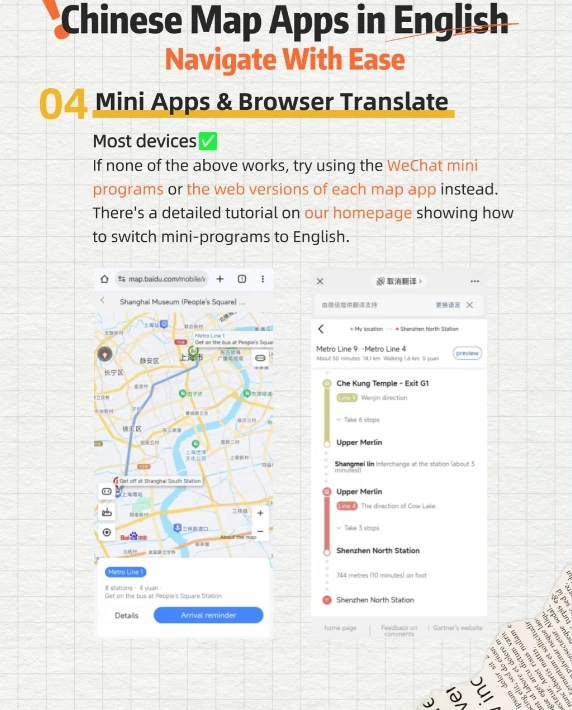








No comments yet.