 Peng Gao
What’s inside
I remember the first time I tried to buy bullet train tickets in China — Google Maps useless, credit card declined, and the app was all in Chinese. After guiding dozens of foreign clients, I’ve cracked the code. Here’s exactly how to buy bullet train tickets without the headache.
The pain points no one tells you
Most guides skip the hard parts. Let me be blunt: you cannot use Google Maps for navigation here. Apple Maps works (weird, I know). Also, your Visa or Mastercard may fail on Chinese websites. Cash is accepted at counters but not for online booking. And that WeChat mini-program everyone recommends? It’s in pure Chinese — a nightmare if you don’t read the language.
Here is the catch: you don’t actually need to master Chinese. You just need the right tool.
Which app actually works for foreigners?
Forget the official 12306 website — it’s a mess with captchas and requires a Chinese ID for full verification. Instead, I always tell my clients to use Trip.com (formerly Ctrip). It’s fully in English, accepts international credit cards, and lets you book with just your passport number. Another solid option is Klook, though it has fewer routes. Trip.com covers almost all bullet trains.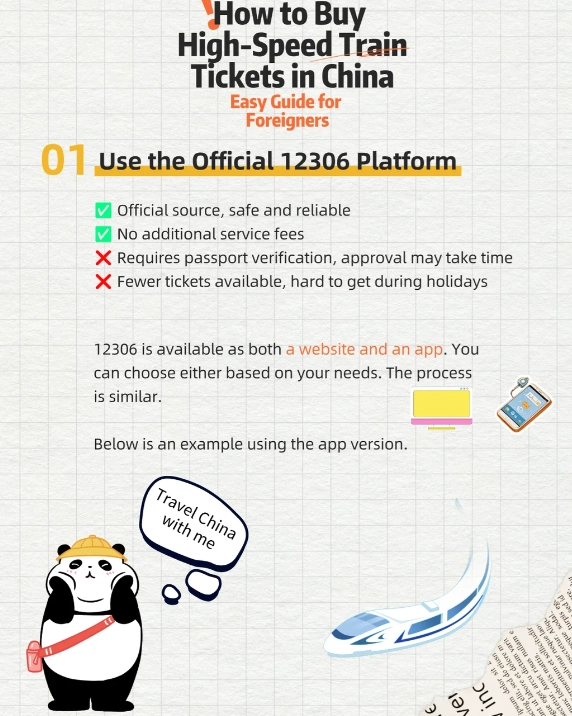
Step-by-step: How to buy bullet train tickets
1. Create an account on Trip.com (2 minutes)
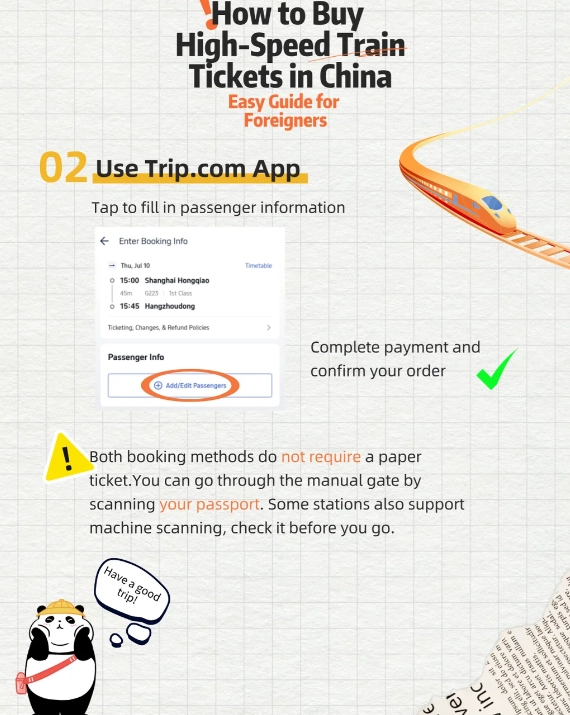
Use your email. You’ll need your passport number and full name exactly as on your passport. I’ve seen bookings rejected because of a minor typo.
2. Search for your route
Example: Beijing South to Shanghai Hongqiao. The system shows all departures. Look for “G” or “D” trains — those are high-speed. Avoid “K” or “T” trains if you’re in a hurry.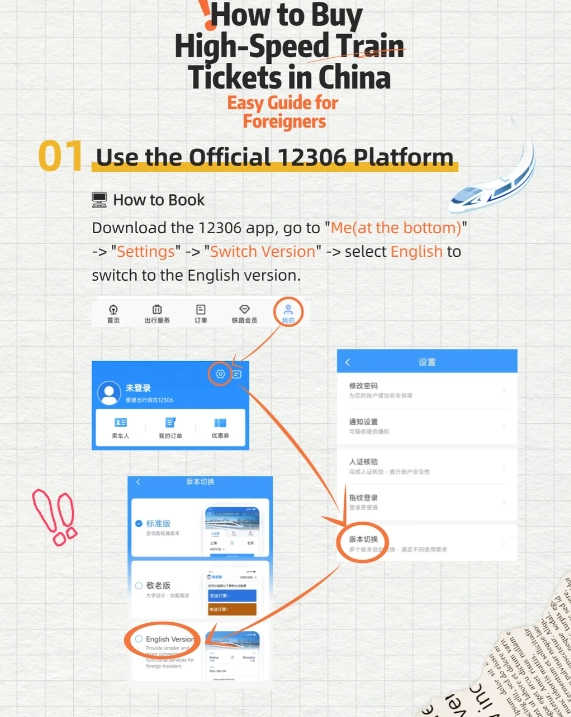
3. Choose your seat class
| Seat Class | Price Range (USD) | Best for |
|---|---|---|
| Second Class (二等座) | $40–$80 | Budget travelers, short trips (<3h) |
| First Class (一等座) | $65–$130 | Comfort, wider seats, more legroom |
| Business Class (商务座) | $120–$250 | Luxury, fully reclining seats, meals included |
4. Pay
Use Visa, Mastercard, or PayPal. Trip.com adds a small service fee (usually $2–$5). If your card is declined, call your bank first — many block international transactions. I also recommend having the Trip.com app ready: it stores your ticket as a QR code.
5. Get your ticket
Digital tickets are accepted at all major stations. You don’t need a paper ticket. Just scan the QR code from the app at the gate. However, for some routes (especially remote ones), you may need a paper ticket. Print it at any station counter — show your passport and booking number.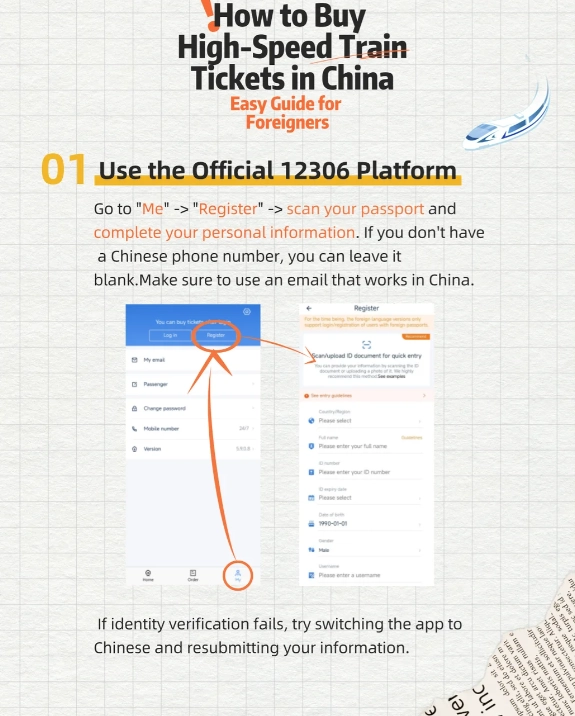
Common mistakes that waste your money & time
I’ve seen it all. Here are the top three blunders:
- Buying at the station on Chinese New Year: Tickets sell out days in advance. Always book ahead, especially during holidays.
- Assuming all trains accept digital tickets: A few small stations don’t. I always check the “e-ticket” indicator on Trip.com. If it says “paper ticket required,” go to the counter early.
- Forgetting you need a VPN: Many booking apps (including Trip.com) work without VPN, but Google services are blocked. Download a reliable VPN before you arrive.
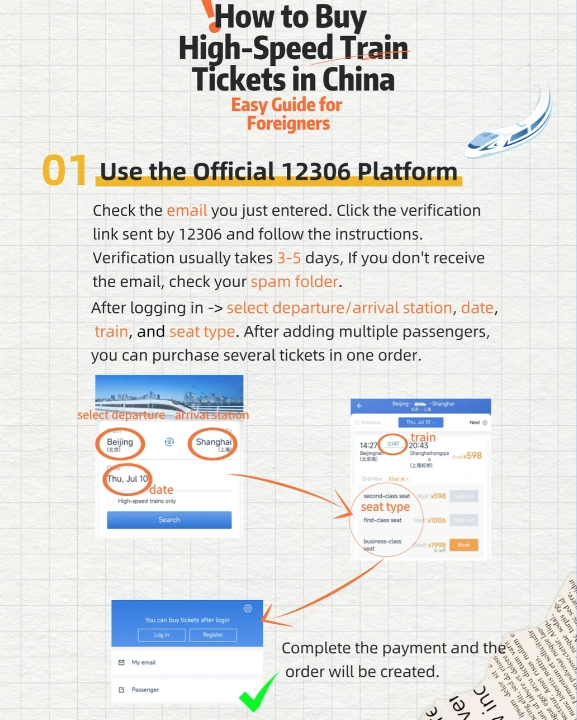
Payment, pickup, and what to bring
Your passport is your golden key. Bring the physical passport — a photo won’t work. For payment, I always carry a backup card. Once, my Visa failed and I had to use my partner’s Amex. Also, keep the Trip.com app open; sometimes the QR code refreshes and you’ll need internet access (WiFi at stations is free but requires a Chinese number).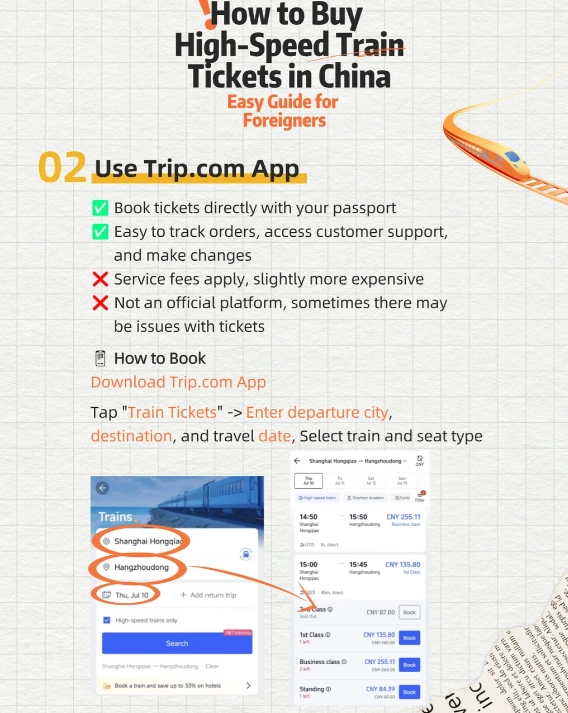
FAQ – real questions from travelers
 Do children need a separate ticket?
Verified and fact-checked by the editorial team.








No comments yet.