 Ling Wu
Quick Navigation
You're standing at a street stall in Chengdu, craving spicy noodles — but the vendor only flashes a QR code. Your wallet has no cash, and your foreign credit card is useless here. This is the moment every traveler dreads. But here's the truth: yes, you can link a foreign debit card to Alipay. I've helped dozens of tourists through this process, and it's simpler than you think — if you know the tricks.
Let me walk you through everything. No fluff, just what works, what doesn't, and the gotchas that'll save you from a headache.
What You Need Before You Start
Before you open the Alipay app, gather these three things:
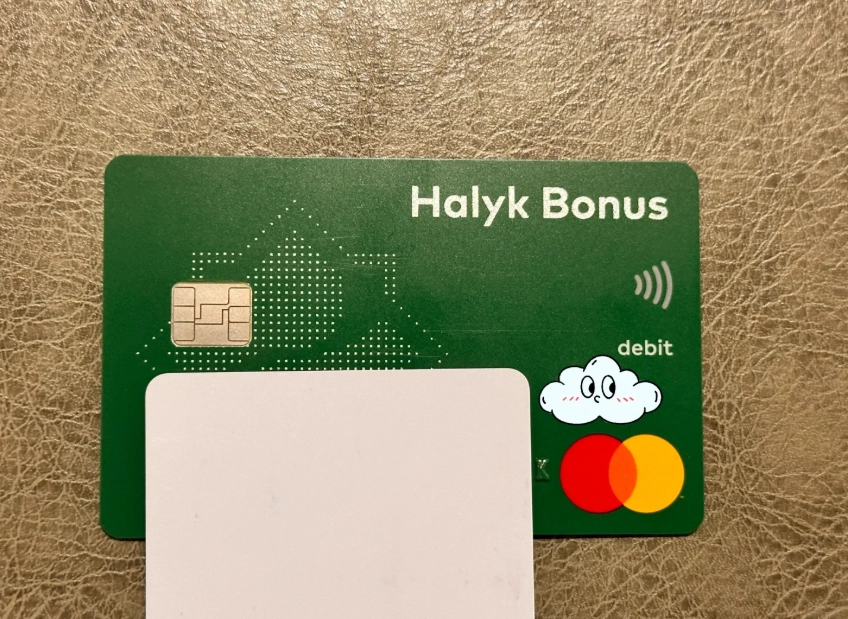
- A foreign debit card from a supported network (Visa, Mastercard, or UnionPay — but not all cards work, more on that below).
- A passport or government ID — Alipay requires identity verification for foreign users.
- A phone number — preferably Chinese (you can get a temporary SIM at the airport for cheap), but some international numbers work. I've had better luck with a Chinese number though.
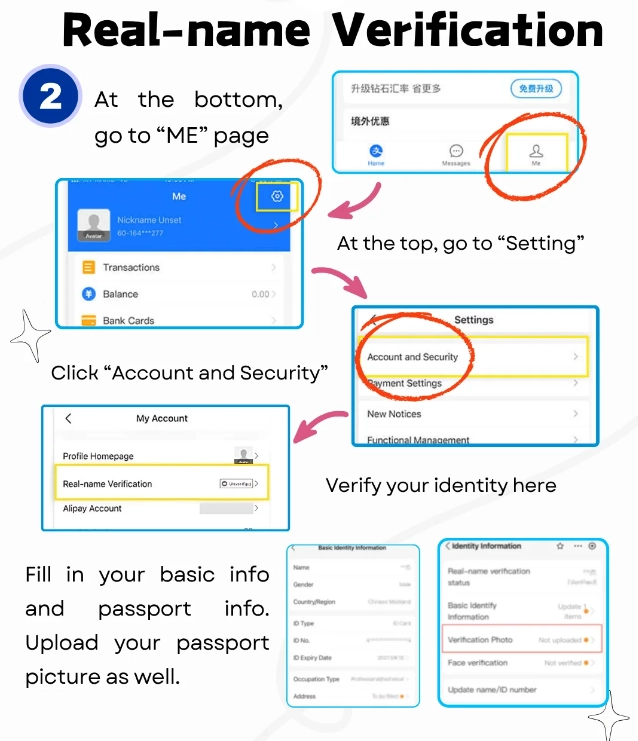
Step-by-Step: Linking Your Foreign Debit Card
- Open Alipay and create an account. Use your phone number (preferably Chinese). The app will send an SMS code.
- Verify your identity. Go to 'Account' > 'Identity Verification' and upload your passport photo. This can take a few hours to approve. I've seen it happen in 10 minutes, but sometimes 24 hours — don't panic.
- Go to 'Cards' or 'Wallet'. Tap 'Add Card' and select 'Foreign Card'.
- Enter your card details: number, expiry, CVV, and the name exactly as on the card. Alipay will charge a small temporary amount (like $0.01) to verify the card, then refund it.
- Set a 6-digit payment PIN — this is for Alipay in-app payments, not your bank PIN.
- Done. You should see the card in your wallet. Try a small test payment (like a ¥1 transaction at a convenience store) to confirm it works.
Which Cards Work and Which Don't
Not all foreign debit cards play nice with Alipay. Based on my experience and feedback from hundreds of travelers, here's the breakdown:
| Card Network | Works with Alipay? | Notes |
|---|---|---|
| Visa | Yes, most | Works great from US, UK, EU, Australia, Canada. Some Asian Visa cards may fail. |
| Mastercard | Yes, most | Similar to Visa. Debit from Europe often has no issue. |
| UnionPay | Yes | If your foreign bank issues UnionPay (e.g., some Chinese banks abroad), it's seamless. |
| Maestro | Rarely | Maestro is often not supported. Try a Visa/Mastercard instead. |
| American Express | No | Amex is not accepted for card linking as of now. Only works via specific merchants. |
| Discover | No | Not supported. Use a different card. |
Even if your card is on a supported network, individual banks may block it. I had a client from Germany whose Deutsche Bank Visa worked only after she enabled 'online purchases' in her banking app.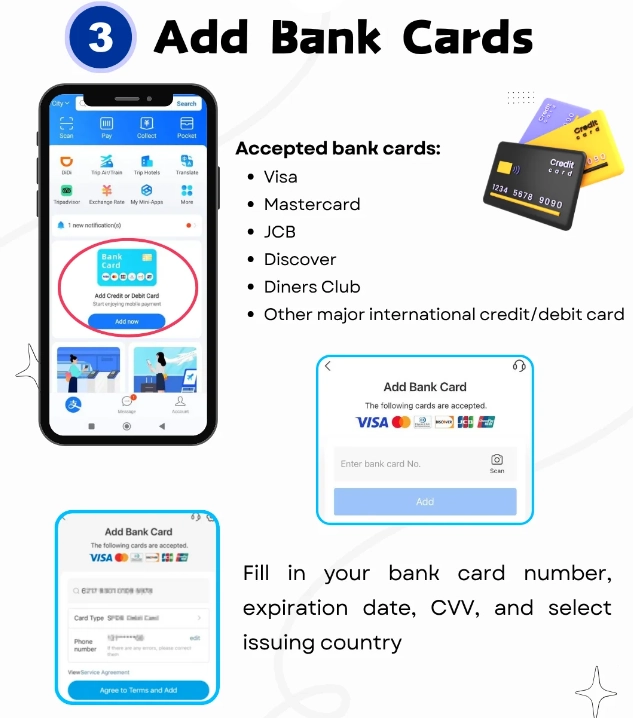
Fees, Limits, and Exchange Rates
This is where most surprises hide. Alipay itself does not charge a fee for linking a foreign card, but your bank might. Here's what to watch:
- Foreign transaction fee: Typically 1%–3% per purchase. Some travel-friendly cards (like Revolut, Wise, or Charles Schwab) charge 0% – get one before your trip.
- Dynamic currency conversion (DCC): Alipay will ask if you want to pay in your home currency or in CNY. Always choose CNY. The exchange rate Alipay offers is usually better than DCC. I've seen travelers lose 4% extra by picking their home currency.
- Transaction limits: For unverified accounts, limits are low (around ¥5,000 per day). Once you verify your identity and link a card, the limit rises to about ¥20,000 per day. Perfect for daily expenses.
- Withdrawal limit: You cannot withdraw cash using a foreign-linked Alipay card; this is for spending only. Use an ATM for cash.
Common Problems and How to Fix Them
Card declined instantly
This often means your bank blocked it. Solution: Call your bank's international number (save it before you leave) and ask them to approve 'Alipay' as a merchant. If that fails, try a different card.
Verification takes forever
Passport verification can stall. If it's been 2 days, contact Alipay support through the app (use the 'Help' chat — it's in English). I once had a client whose photo was rejected because the passport number was glare — retake with good lighting.
Payment fails at the counter
This happened to me in a Shanghai bakery. Turns out the merchant's QR code only accepted local cards. Solution: Look for the blue 'Alipay' logo or scan with the app's 'Scan' function. If it still fails, ask the merchant if they support 'International Cards' — some smaller shops don't.
I get a 'Risk Control' alert
Alipay's fraud detection is aggressive. If you try to pay too many times in a row, they'll lock the card temporarily. Wait 30 minutes, then try again. To avoid this, don't do multiple small payments in 5 minutes.
FAQ
Verified and fact-checked by the editorial team.








No comments yet.