 Ling Wu
Quick Navigation
The payment system here is… different. Cash is almost extinct in major cities. And your Visa or Mastercard? Won’t work at 90% of places. The first time I brought a group, we stood at a street stall, and the vendor just pointed at the QR code — no cash accepted. That’s when I realized: you need Alipay international version before you land.
After guiding hundreds of tourists through this process, I’ve boiled it down to the exact steps that work for foreigners. Let me show you how to set it up without the frustration.
Why You Must Set Up Alipay International Version
Alipay isn’t just for payments. It’s your all-in-one tool for China travel. You’ll use it to:
- Pay at restaurants, supermarkets, and taxis
- Book train tickets via Trip.com or directly in the app
- Order food delivery (Ele.me) or a ride (Didi)
- Split bills with friends
- Even donate at temples — yes, temples have QR codes now
Without it, you’ll be stuck fumbling with cash or begging locals to help you pay. WeChat Pay is also popular, but Alipay’s international version is more tourist-friendly. Let’s get it done.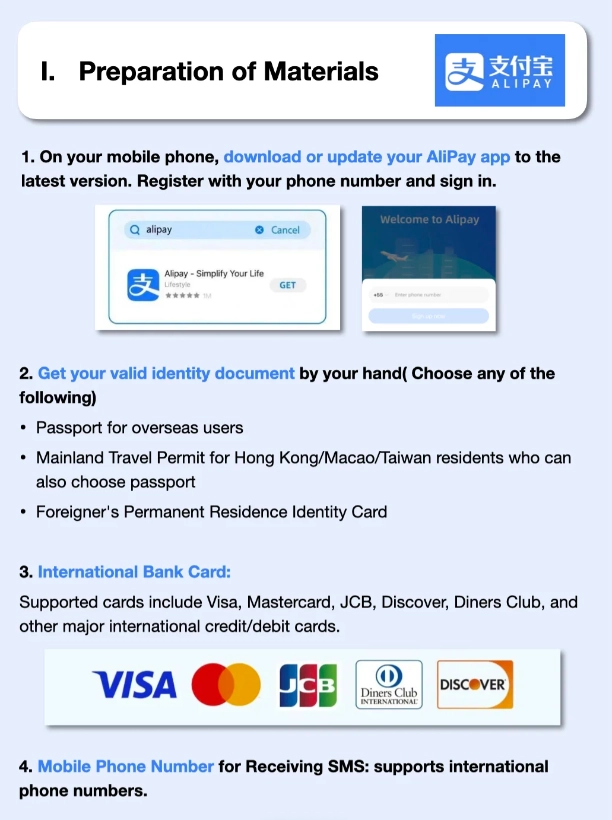
How to Set Up Alipay International Version: Step-by-Step
Step 1: Download the Right App
Go to the App Store (iOS) or Google Play (Android) and search for “Alipay”. The official icon is blue with a white “支” character. Avoid fake apps — there are clones. Download only from the official store. The app will automatically detect your region and offer the international version.
Step 2: Register with Your Passport
Open the app and tap “Sign Up”. You’ll need:
- Your mobile phone number (can be your home country number — but you’ll need to receive SMS for verification. If your carrier doesn’t support roaming SMS, use a Chinese number or a virtual SIM like Airalo).
- Your full name as it appears on your passport.
- Passport number, expiry date, and a photo of your passport’s main page.
- A selfie holding your passport (for verification).
This is where most people get stuck. Make sure the photo is clear, with no reflection. The system is automated, and blurry photos get rejected. I always tell my guests: take the photo in daylight, flat on a table.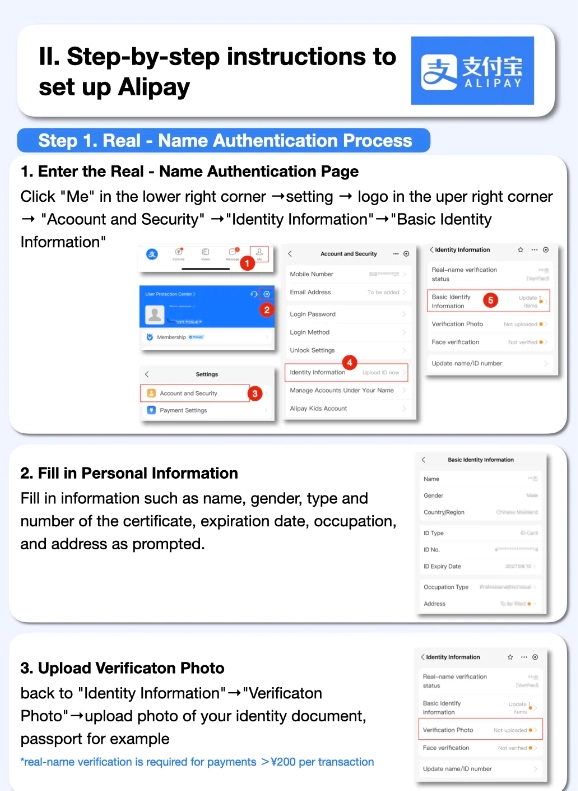
Step 3: Link Your International Credit Card
After registration, go to “Me” → “Bank Cards” → “Add a Card”. You can link Visa, Mastercard, JCB, Diners Club, or Discover. American Express is not supported yet. Enter your card details, and Alipay will make a small temporary charge (usually 1 CNY) to verify the card — this charge is refunded.
Step 4: Complete Verification (Tourist Pass)
For foreign tourists, there’s an extra step — the Tourist Pass (also called “Alipay Tour Card”). This is a prepaid virtual card issued by Bank of Shanghai, allowing you to top up and pay like a local. To activate it:
- In the app, search “Tour Pass” or “Tour Card”.
- Follow the instructions to apply. You’ll need to upload passport photos again (they may ask for a second selfie).
- Once approved, you can top up using your linked international card (with a 5% fee — avoid top-ups; use direct card payment when possible).
Actually, the Tourist Pass is not strictly necessary anymore. Since 2023, Alipay allows direct card payments for most merchants under ¥200. But for larger amounts, you might need it. I recommend activating it just in case, but don’t top up unless necessary.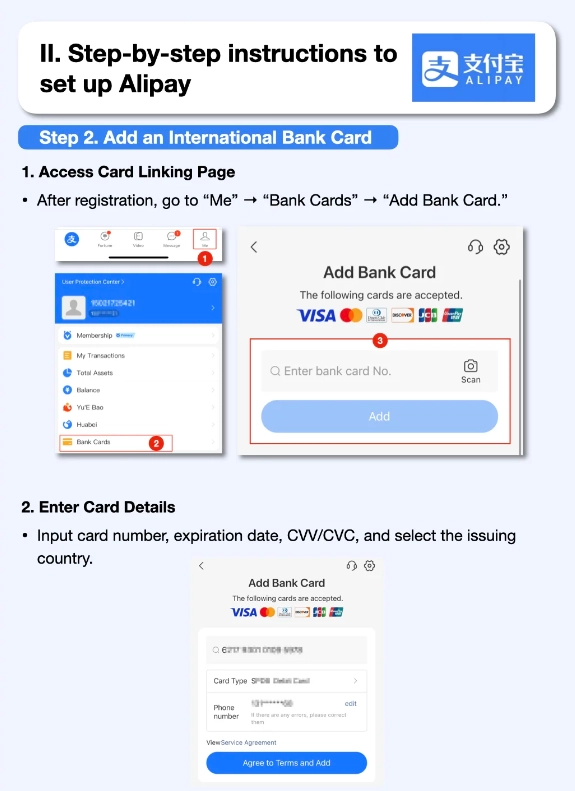
Common Problems & How to Fix Them
Problem: Credit Card Declined
Why it happens: Your issuing bank blocked the transaction, or the merchant doesn’t accept international cards. Solution: Use the Tourist Pass top-up (even with the fee) or try WeChat Pay as a backup. Also, check if your card is enabled for international use in your banking app.
Problem: Can’t Receive SMS Code
Why it happens: Your home number doesn’t have roaming. Solution: If you have a dual-SIM phone, buy a Chinese SIM card at the airport (China Mobile, Unicom, or Telecom — all work). Use that number for Alipay registration. Or use an eSIM from Airalo (China data only, no voice/SMS) — but then you can’t receive SMS, so go with the physical SIM.
Problem: Passport Verification Fails
Why it happens: Blurry photo, name mismatch, or the system glitches. Solution: Try again in good lighting, ensure the passport data page is fully visible. If it still fails, switch to the Alipay Tour Card method — it sometimes bypasses the main verification. Still stuck? Ask your hotel front desk for help; they deal with this daily.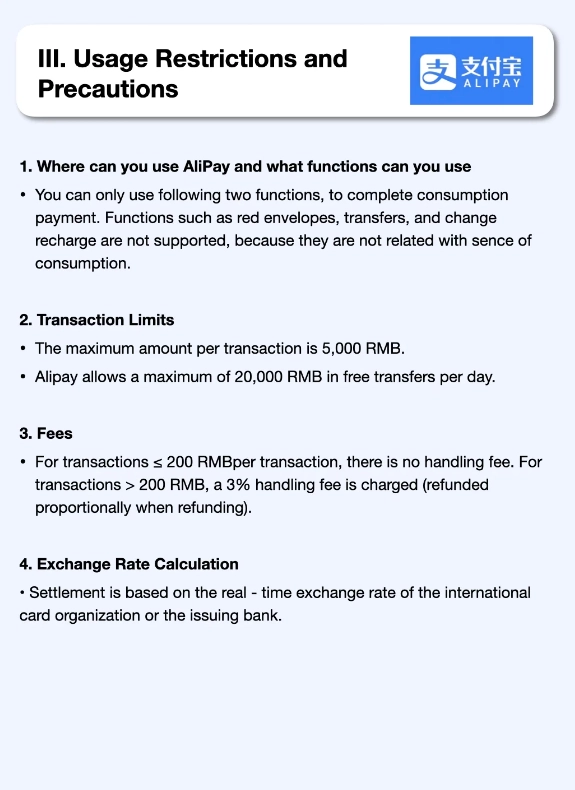
Where Can You Use Alipay International Version?
Almost everywhere. Here’s a quick table:
| Place | Accepted? | Notes |
|---|---|---|
| Restaurants & cafes | Yes | Most places have QR codes; just scan and pay. |
| Supermarkets (like Carrefour, Walmart) | Yes | Self-checkout also accepts Alipay scan. |
| Street vendors & small shops | Usually yes | QR code often displayed; if not, ask “Zhi fu bao?” |
| Taxi | Sometimes | Better to use Didi (ride-hailing) within Alipay. |
| Attractions & museums | Mostly yes | Ticket booths accept Alipay; online booking also. |
| High-speed train & flight booking | Yes (via Trip.com mini program) | International cards work directly. |
| Hotels | Yes | Both online and at front desk. |
Pro tip: Always have a backup. Even after setup, some small businesses might refuse your international card because they only accept domestic QR codes from Chinese bank accounts. Keep ¥100-200 in cash just in case (for emergencies like toll roads or tiny stalls).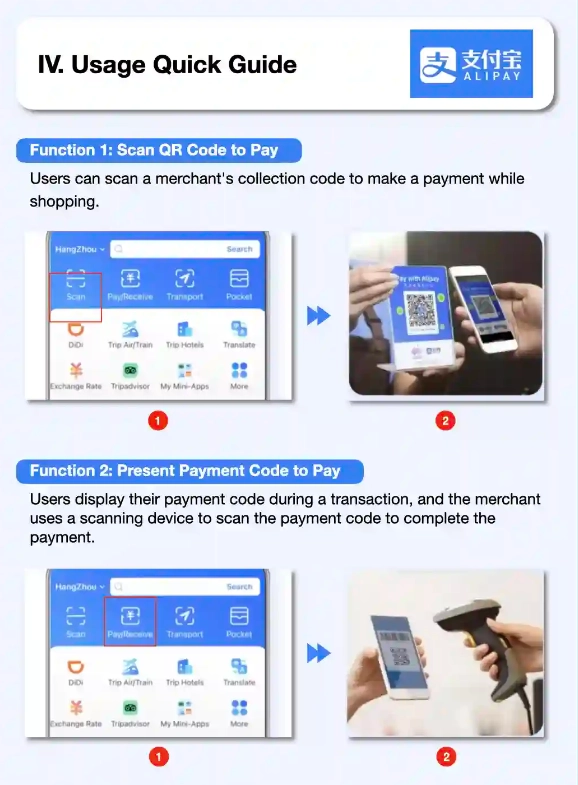
Which One Should Tourists Use: Alipay or WeChat Pay?
Both work, but here’s my honest take after years on the ground:
- Alipay international version: Easier to register with a passport and link foreign cards. Better for large purchases (direct card payment up to ¥200). More English-friendly interface.
- WeChat Pay: Ubiquitous for social payments and mini programs, but harder for foreigners to set up (often requires a Chinese bank account). You can try, but expect more friction.
My recommendation: Set up Alipay first. Download WeChat and activate its payment only if you’re tech-savvy and have a Chinese friend to help. 90% of merchants accept both, so one is enough.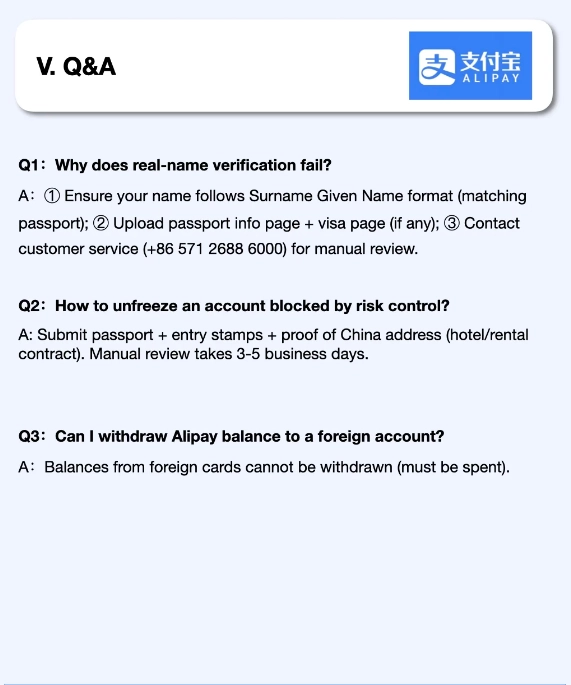
Extra Tips for Smooth Alipay Use in China
- VPN is mandatory: Alipay works without VPN, but many other essential apps (Google Maps, WhatsApp, Instagram) are blocked. Install a reliable VPN before you leave home.
- Don’t rely on Google Maps: Use Apple Maps (which integrates with local data) or Amap (Gaode) — but Amap is Chinese-only. For English, Apple Maps is your friend. To get a cab, use the Didi mini program inside Alipay.
- Translation apps: Download Baidu Translate or Apple Translate. Alipay’s built-in translation is limited.
- Alipay mini programs: Discover them by searching within the app. For example, “Didi” for rides, “Ele.me” for food delivery, “12306” for train tickets (though 12306 mini program is in Chinese — use Trip.com instead).
- Security: Enable fingerprint or face ID for payments. Never share your QR code with strangers.








No comments yet.