 Ting Chen
What You'll Learn
I still remember the panic on a guest's face last spring. He was standing at a street-side noodle stall in Shanghai, starving, with a crisp Visa card in hand—and the vendor just pointed at a QR code. No cash accepted. No card machine. Just that little black-and-white square. He couldn't even order because he hadn't linked his Visa card to Alipay yet. Don't be that person.
Linking your Visa card to Alipay is the single most important step you can take before landing in China. It's the digital key to almost every transaction: from buying a subway ticket to splitting a dinner bill. But doing it from outside China? That's where things get tricky. I've helped dozens of travelers through this exact process, so let me save you the headaches.
Here's the truth: you can absolutely link a foreign-issued Visa card to Alipay, but the app doesn't make it obvious. Most guides skip the crucial caveats—like which card networks work, what to do when your bank blocks the verification charge, and why the app might refuse your card for no clear reason. This guide covers all of that.
Why This Matters (and Why Tourists Get Stuck)
China is basically a cashless society now. Even street vendors have QR codes. Your hotel, the metro, the corner convenience store—everyone expects Alipay or WeChat Pay. Carrying wads of RMB works in some places, but you'll lose time and often get worse exchange rates.
Here's the catch: Alipay's international profile is different from the domestic version. If you try to sign up with a foreign phone number and later want to add a Visa card, you might hit a wall. The trick is to set your region properly and use the Tour Pass feature (if you don't have a Chinese bank account). But many travelers don't know that the standard “Add Card” option inside Alipay is only for Chinese bank cards. You need to use the “International Card” channel instead.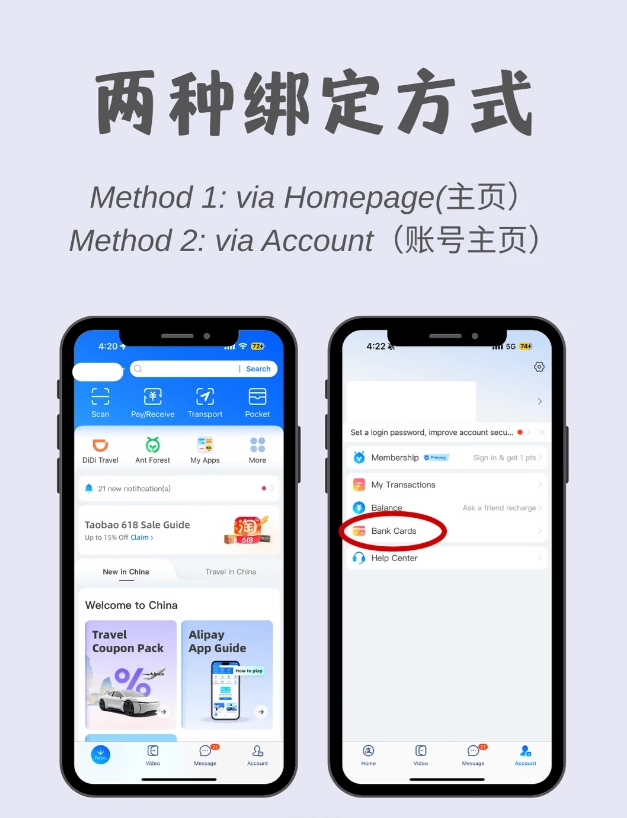
Before You Start: What You Need
Don't start the process until you have these ready:
- A valid Visa credit or debit card – Not prepaid cards or Maestro. Visa-branded cards from most countries work, but some banks (especially in the US and UK) block international transactions by default. Call your bank and tell them you'll be making small test charges from Alipay in China.
- A passport – Alipay requires identity verification for international users. You'll need to take a photo of your passport page.
- An active phone number that can receive SMS – Your home number works, but make sure it can receive international texts. Some travelers use a Chinese SIM upon arrival, but linking often fails if you change numbers mid-process. I recommend using your home number first, then switching to a Chinese SIM after everything is set up.
- A reliable internet connection – Do the setup in your home country or at your hotel's Wi-Fi. Public Wi-Fi in China often blocks Alipay's verification servers (due to the firewall). If you're already in China and struggling, turn on your VPN before starting.
Step-by-Step: Linking Your Visa Card to Alipay
I'll walk you through the exact sequence that worked for my guests (and for me on my last trip). The screenshots change constantly, but the path stays similar.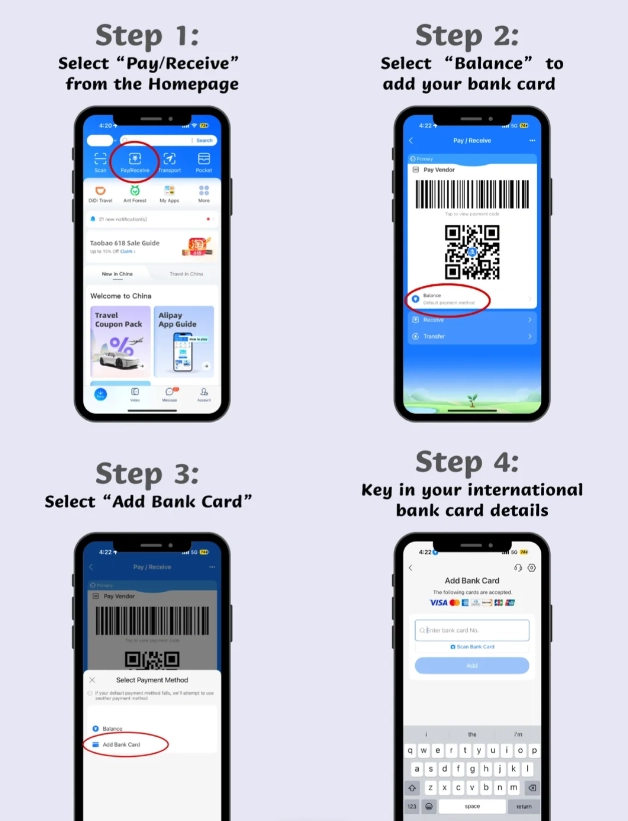
1. Download and Register Alipay
Get the app from your app store (search “Alipay” – make sure it's the real one, by Ant Group). During sign-up, choose your region as “Mainland China” if you plan to use it in China, but if you're registering outside China, pick your home country first—you can change it later. Use your email for login, not phone number, if possible; it's easier to keep consistent.
2. Verify Your Identity
Go to Me (bottom right) → Settings (gear icon) → Identity Verification. You'll need to upload a clear photo of your passport's photo page and a selfie. The system may take 1–2 minutes to check. If it fails, make sure the passport is well-lit and the photo is not cropped. Only proceed to add your card after the identity verification is approved—trying to add a card before verification often leads to “card not supported” errors.
3. Find the International Card Option
Go to Me → Bank Cards (or “Cards”). You'll see a big “Add Card” button. Don't use it! That's for Chinese bank cards. Instead, scroll down to the bottom of the Bank Cards page and look for a small link that says “Add International Card” or “International Card” (sometimes under “More Services”). On some versions, it's hidden under Me → Alipay+ . If you can't find it, search “Alipay Tour Pass” in the app—that's a separate feature that also lets you preload money with a Visa card, but I'll focus on direct card linking here.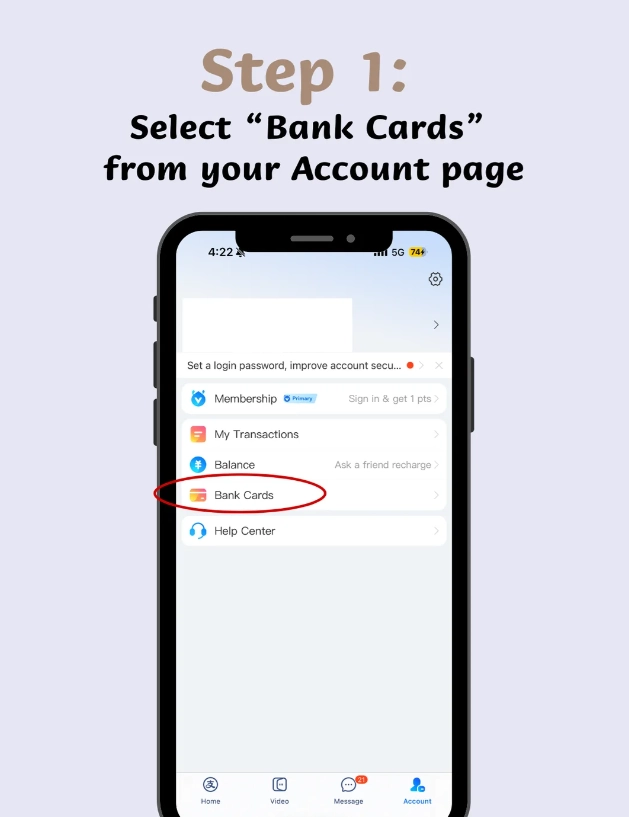
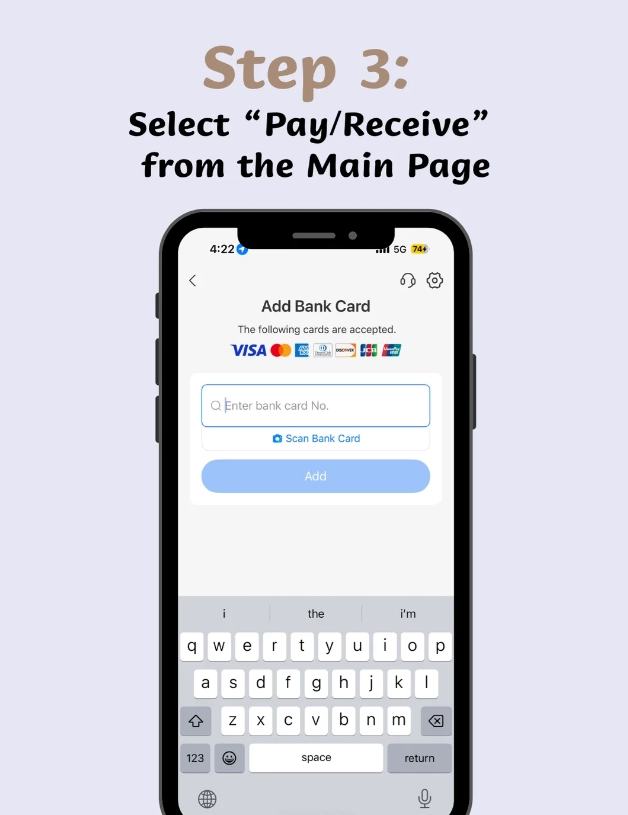
4. Enter Your Card Details
Tap “Add International Card” and fill in your Visa card number, expiration date, and CVV. The cardholder name must exactly match the name on your Alipay account and passport. If your passport has a middle name, include it. The system will attempt a small authorization charge (like $1–$2) to verify the card. This charge is refunded within a few days, but your bank might show it as pending.
5. Verify via SMS or Email
Alipay will send a 6-digit code to your registered phone or email. Enter it quickly (it expires in 5 minutes). If you don't receive it, check your spam folder or request a resend. Some international numbers face delays—try again after 10 minutes.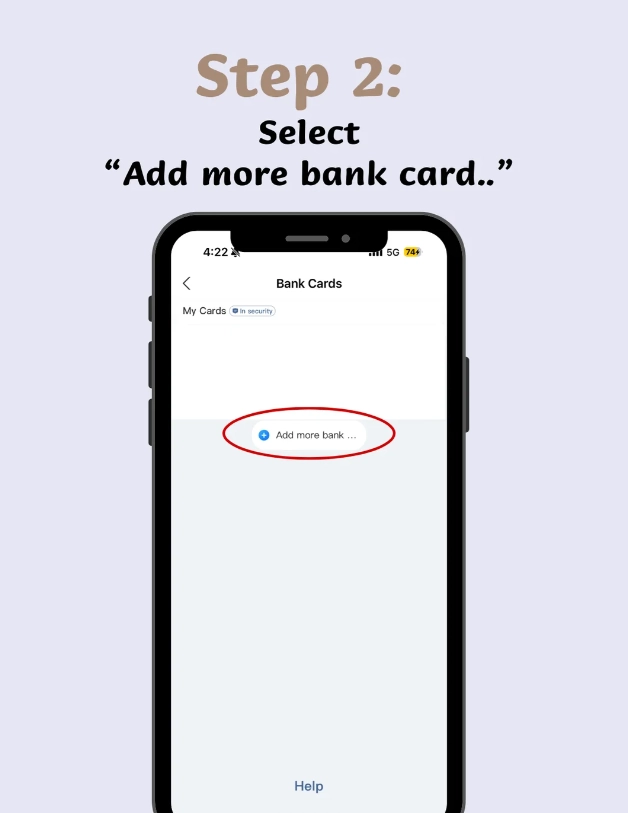
6. Set as Preferred Payment
Once the card is added, go back to Me → Payment Settings → Default Payment Method and select your Visa card. Now when you scan a merchant's QR code, Alipay will automatically charge your Visa card (with a 3% foreign transaction fee plus whatever your bank charges).
Common Errors & How to Fix Them
I've seen these errors more times than I can count:
| Error Message | Likely Cause | Fix |
|---|---|---|
| “Card not supported” | You are using the wrong “Add Card” button (Chinese bank card version). | Use “Add International Card” or Tour Pass. |
| “Verification failed” | Passport photo is blurry, or name mismatch. | Re-upload with better lighting. Check cardholder name exactly. |
| “SMS not received” | Carrier blocks Alipay's shortcodes. | Use email verification instead (if available). Or switch to a Chinese SIM temporarily. |
| “Limit reached” | You may have attempted too many times in 24 hours. | Wait a full day before trying again. Avoid multiple card attempts. |
| “Transaction declined by bank” | Your bank flagged the test charge as suspicious. | Call your bank and ask them to whitelist Alipay transactions. You can also ask for the transaction reference from Alipay support. |
Payment Tips: Using Alipay in China
Once your Visa card is linked, here's what to expect:
- Small merchants (street food, taxis, convenience stores) will only show a personal QR code. You can scan that with Alipay's “Scan” feature. For personal QR codes, Alipay will use your linked Visa card directly.
- Large merchants (hotels, restaurants, stores) often use a merchant terminal. You show your Alipay payment QR code (under “Pay/Collect”) and they scan it. That also charges your Visa card.
- Subway and bus in most cities now support Alipay's transit card. Open Alipay → “Transport” → select city → activate the metro card. You can load a small amount with your Visa card, but keep in mind it might take a few minutes to process.
- Foreign transaction fees: Alipay itself charges about 3% on international card transactions. Your bank may add 1–3% more. So a ¥100 meal might actually cost you around ¥106–¥109. Some travelers prefer to use Tour Pass (which has a lower fee if you load large amounts) or bring a no-foreign-fee credit card.
- Cash backup: Always carry at least ¥200 in cash. Some small alley vendors and the occasional taxi driver claim their QR code is “not working.” Also, if your phone dies or you lose connectivity, cash is king. Withdraw from bank ATMs that accept Visa (Bank of China, ICBC, HSBC) – usually a ¥20–30 fee per withdrawal.
Frequently Asked Questions
Verified and fact-checked by the editorial team.








No comments yet.