 Hua Sun
What You'll Learn (Quick Navigation)
You're standing on a curb in Beijing. Your phone is dying. No taxi will stop. I've been there — with clients. That's when I showed them the Didi English app. Let me save you the panic.
I've helped dozens of tourists navigate the Didi English app tutorial, and here's the truth: booking a ride is easier than you think — if you know the tricks. Most guides skip the sticky parts like payment setup or how to handle a driver who doesn't speak English. This one won't.
The real secret? Set up the English version before you land, and link Alipay with your international card. That's it. Now let's dive in.
Why Didi Is a Must for Foreigners
Google Maps? Useless for booking. Taxis on the street? They'll likely wave you off if you can't say the address in Chinese. Didi solves both. It's the Uber of China, but with an English interface that works surprisingly well. Plus, you see the fare upfront, no haggling, no scams.
Download & Setup: Avoid the "China App Store" Trap
Step 1: Get the Right Version
If you're on iPhone, you must download the Didi Rider app before arriving, or switch your App Store region to China. Android users can grab the APK from the official Didi website (again, do it before you land — Chinese app stores are a maze).
Step 2: Registration with a Foreign Number
Good news: Didi accepts international phone numbers. Enter your number, receive the SMS code. If the code doesn't arrive (happens often), try again after 10 minutes or use a VPN to trigger a different routing.
Step 3: Language Switch
Once registered, go to Settings (the gear icon) → Language → switch to English. The app will restart. If some text stays in Chinese, don't panic — the key booking buttons remain in English.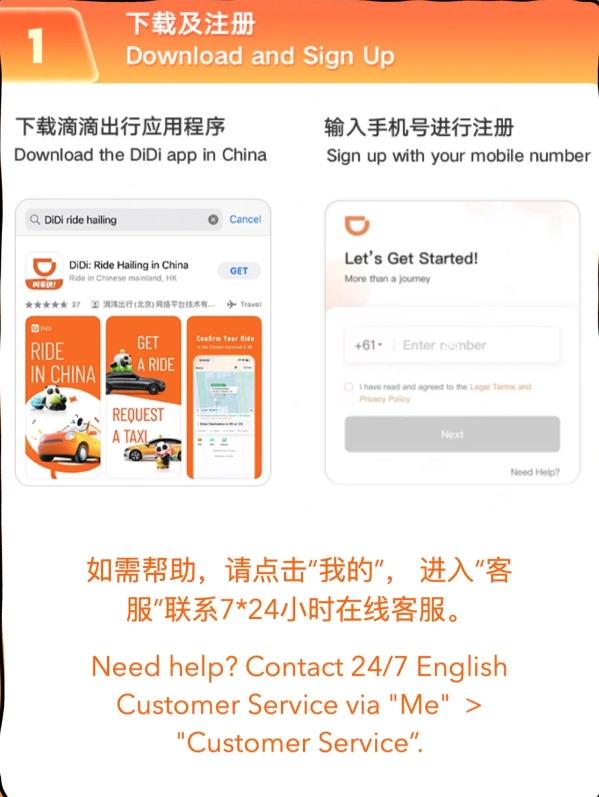
Booking Your First Ride (English Interface)
Step-by-Step
- Open the app. You'll see a map with your current location.
- Enter destination — type in English. Didi uses Baidu Maps, so most landmarks, hotels, and well-known spots are recognized. Pro tip: use the Chinese name + English name for best results.
- Choose ride type. The default is "Express" — cheapest. You also have "Premier" and "Taxi". Prices shown are estimates.
- Confirm pickup. Drag the blue pin if you're not exactly where you are — this matters!
- Request. Hit the big green button. A driver will accept within seconds usually.
What Happens When a Driver Accepts?
You'll see the driver's car plate, phone number (partially hidden), and real-time location. Important: You can message the driver via in-app chat — it auto-translates! Type in English, it sends in Chinese. Use this to say "I'm at the north gate" or "Please wait, I'm coming."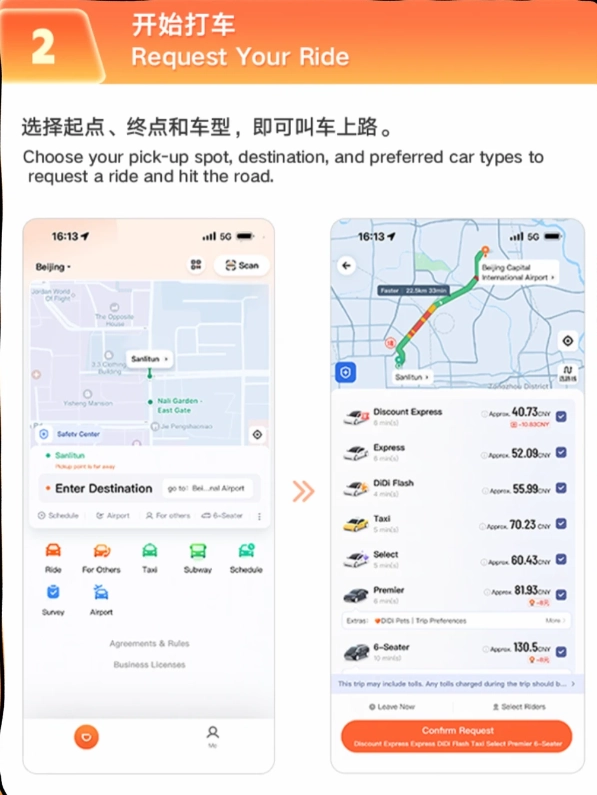
Payment: Cards, Alipay & the "I'm Broke" Moment
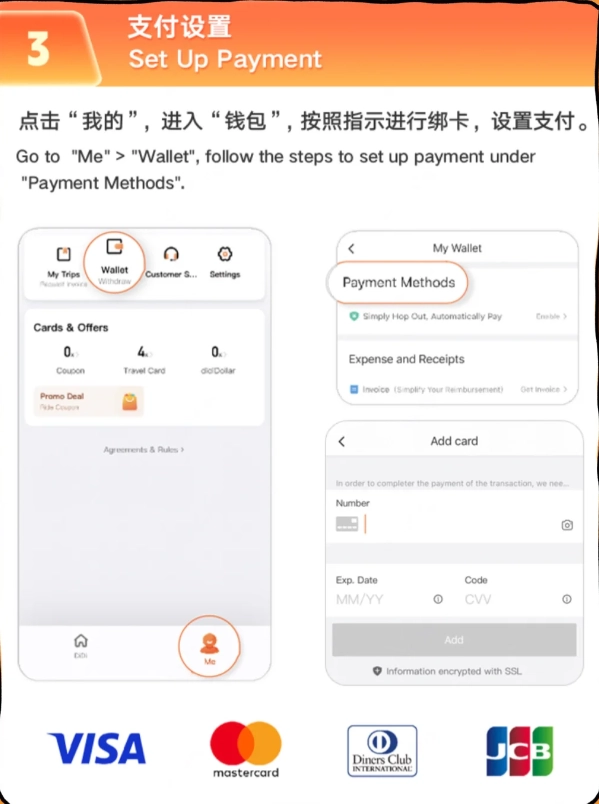
Cash? Not accepted in-app. Didi requires a digital payment method. Here are your options:
| Method | Works for Foreigners? | Setup Difficulty | My Recommendation |
|---|---|---|---|
| Alipay (International Card) | Yes | Medium - need to link card | Best choice. Link Visa/Mastercard, top up or pay directly. |
| WeChat Pay | Yes, but sometimes fails | Medium | Backup method. Some foreign cards declined. |
| UnionPay Card (issued outside China) | Yes | Easy | If you have one, it's seamless. |
| Cash to Driver | No (app only) | N/A | Don't bother — drivers can't process cash through the system. |
Common Pitfalls (I've Seen Them All)
- GPS drift. In dense cities like Shanghai, the pin may show you on the wrong side of the street. Always double-check your pickup location and move the pin if needed. I once watched a client wait 15 minutes at the south gate while the driver was at the north gate.
- Driver cancellation. If your pickup spot is a busy intersection or a hard-to-find alley, drivers may cancel. Use a landmark like a hotel or a big store as your pickup point.
- Rating system. Didi drivers can see your rating. New users start at 5.0. If you cancel too many rides, your rating drops and drivers may reject you. Be considerate.
- No reception. In subway stations or underground malls, the app won't work. Always request your ride when you're above ground.
Pro Tips from a Tour Guide
Tip 1: Use "Add Stop" for multi-leg trips. Need to pick up a friend then go to dinner? Add a stop in the app so the driver knows.
Tip 2: Call the driver after booking. Even though the app sends your location, call (they have your number) to confirm: "Hello, I'm at the hotel entrance." Most drivers know a few English words, or use the auto-translate chat.
Tip 3: Keep your destination visible on your phone. If the driver can't find you, show them the map. Or better, create a screenshot of the destination in Chinese before you go out.
Tip 4: Avoid peak surge pricing. Rainy evenings near tourist spots? Prices can double. Wait 10 minutes or walk a block away to reduce the surge.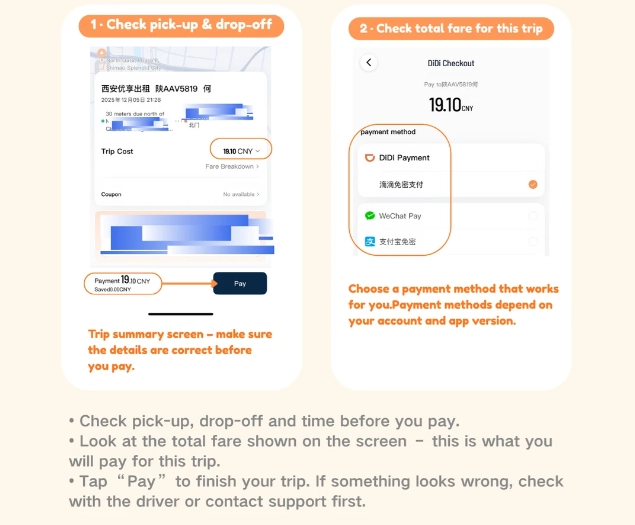
"I always tell my clients: think of Didi as your personal chauffeur. But treat it with respect — your phone battery matters. Carry a power bank."
Frequently Asked Questions
Verified and fact-checked by the editorial team.








I've been in Beijing for two months and tried multiple tutorials – this one is by far the best. It's not just a list of steps; it explains the logic behind each button and gives alternative methods for those without a Chinese phone number. I especially loved the tip about using the 'favorite places' feature in English. I've already shared it with my entire WeChat expat group. Five stars, no question.
This tutorial is a lifesaver for anyone new to China! I showed it to my friend who just arrived and couldn't even open the app. The step-by-step English instructions, especially on how to type in English addresses and use the message templates to communicate with the driver, are brilliant. No more standing on street corners waving at taxis. Absolutely essential download before you travel!
Honestly, pretty disappointed. The tutorial covers the basics, but it completely skips over what to do if the driver calls you. I had a driver call and I couldn't understand a word – no help on how to handle that. Also, the part about Alipay didn't work for me because I don't have a Chinese bank account. Felt like half the solution. Might be okay for a very simple ride, but not for real-world situations.
Good guide overall, but a bit outdated. I followed the steps and was able to book my first ride without Chinese, but the app interface has changed slightly since the tutorial was made – the 'phone verification' button moved to a different spot. Took me a minute to find it. Still, it got the job done and I'm grateful for the help. Just wish it was updated more recently.
Finally a tutorial that actually works! I've been struggling with Didi for weeks because I don't read Chinese. This guide walked me through every step, from signing up to paying with my foreign card. The screenshots were super clear and the English labels matched the app perfectly. Saved my trip to Shanghai – 10/10 would recommend to any expat or traveler!
Honestly, best tutorial I've found for any Chinese app. The pacing is perfect, and the real-time demo of booking a ride felt like having a friend next to me. I was skeptical at first because I've been burned by bad guides, but this one delivered. A must-watch for any expat.
As a newcomer to Beijing, this guide was exactly what I needed. The English interface tips saved me so much time, and the cultural notes about confirming the license plate were spot-on. I’ve used DiDi five times since watching and zero issues. Absolute gem!
This tutorial is a lifesaver! I was so nervous about using DiDi in Chengdu, but the step-by-step walkthrough made everything super simple. Even the strange pop-ups were explained. I’ve already recommended it to three other travelers at my hostel. 10/10!
Pretty solid guide overall! The screenshots helped a lot, though I wish the voiceover was a bit clearer on the payment options. Still managed to book my first ride without any Chinese—definitely got me out of a jam near the Bund.
The tutorial was okay, but I wish it had more visuals. I followed the steps on the subway and still got confused when the app switched to Chinese midway. Not terrible, but not as smooth as I hoped for a 'no Chinese' guide.