 Ling Wu
What’s inside this guide
Stuck at the Alipay registration screen? I’ve been there. Handing a 100-yuan note to a street vendor who just points at his QR code — that’s the moment you realize you need this app working. Here’s the truth: most online guides skip the part where your passport photo gets rejected three times. Let me show you the exact way around it.
Your foreign Visa card, a working VPN, and a smartphone with a decent camera — you’ll need all three. Let’s dive into the actual steps, no fluff.
What You Need Before Starting
Before you open the App Store, gather these items. Missing even one can stall the whole process.
| Item | Why It’s Needed | Details |
|---|---|---|
| Valid passport | Identity verification | Must be the same nationality as your phone number’s country. No expired passports. |
| International phone number | Receive SMS verification code | Works with most non-Chinese numbers (US, UK, AU, etc.). Ensure roaming is on. |
| International credit/debit card | Link for payments | Visa, Mastercard, Amex, or JCB. Must have 3D Secure enabled. |
| VPN service | Access Alipay’s servers reliably | China’s firewall sometimes blocks the app’s initial connection. A stable VPN helps. |
| Translation app (optional) | Navigate Chinese-only screens | Apple Translate or Baidu Translate. Alipay’s English mode covers most but not all. |
Step-by-Step Alipay International Registration
Downloading the App and Choosing Language
Search for “Alipay” in your App Store (not “AlipayHK” or “Alipay Wallet” — those are different). After installing, open the app — it should default to English if your phone language is English. If not, tap the profile icon in the bottom right, then the gear icon (Settings), and switch to “English”.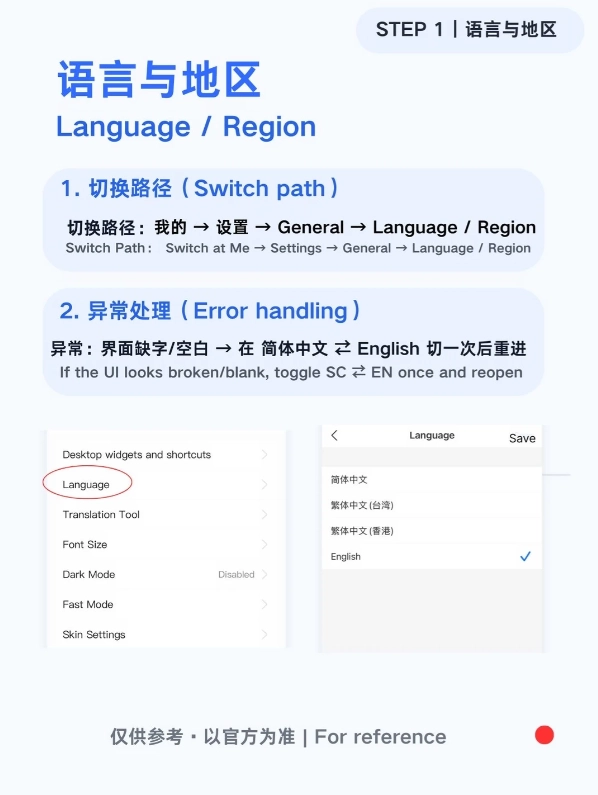
Creating an Account with Your Passport
Enter your phone number. Make sure it includes the full international prefix (e.g., +1 for US, +44 for UK). You’ll receive a 6-digit SMS code — if it doesn’t arrive within 60 seconds, request a resend. I’ve seen cases where the code takes up to 3 minutes, so be patient.
Next, set a password. Alipay requires at least 8 characters with a mix of letters and numbers. Avoid using your bank password — this isn’t your bank. Then, fill in your name exactly as it appears on your passport. Don’t add spaces for middle names if the passport doesn’t have them — small mismatches cause verification failures.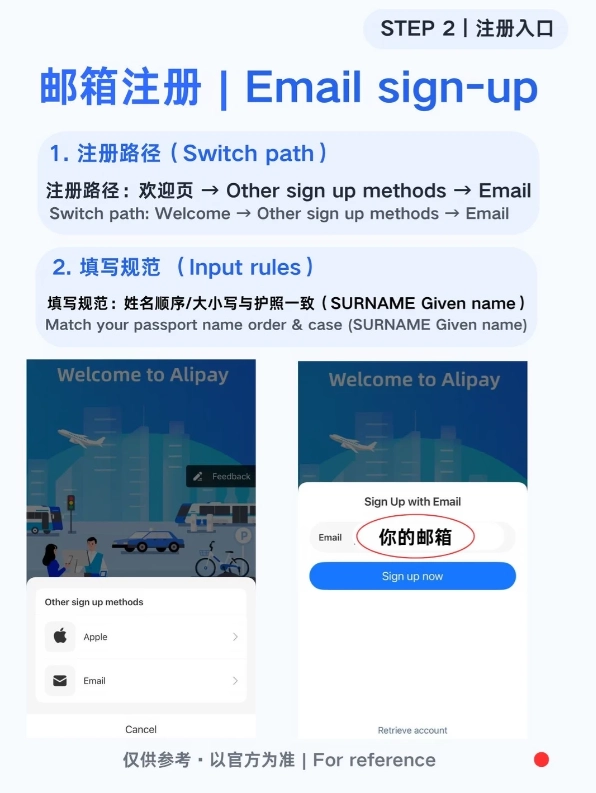
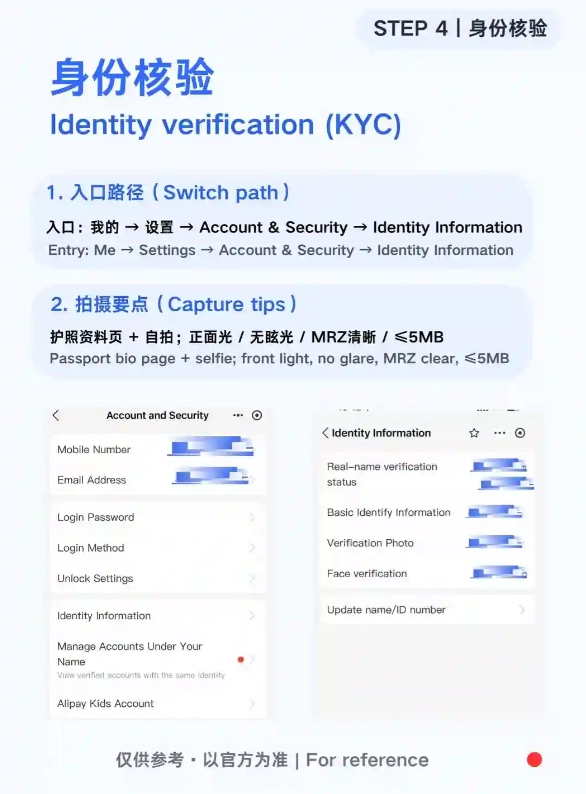
Identity Verification (The Tricky Part)
This is where most tourists get stuck. You’ll need to take a photo of your passport’s data page. Here’s the trick: place it on a dark, flat surface, avoid glare, and ensure all four corners are visible. Use natural daylight — overhead lamps often create shadows. After the photo, you’ll be asked to take a live selfie. Align your face within the oval guide. Remove glasses if you normally don’t wear them for ID photos; the system can get confused.
Verification usually takes 5 minutes to 24 hours. In my experience, submitting during daytime in China (UTC+8) speeds things up because the review team is active. If it fails, you’ll get a generic error. Don’t panic — retake the passport photo with better lighting. I’ve seen passports from certain countries (e.g., India, Nigeria) require manual review. If it fails twice, contact Alipay’s international support via email: [email protected].
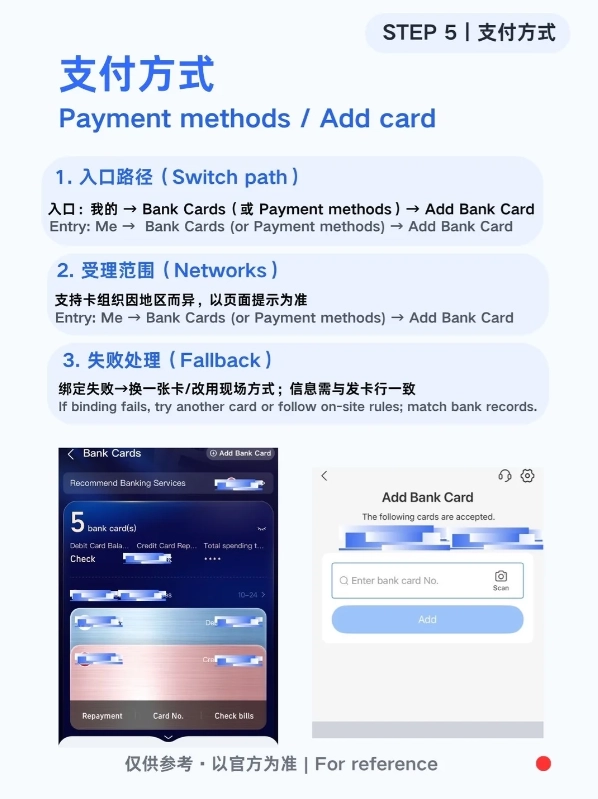
Linking Your International Credit Card
Once your identity is approved, go to “Me” > “Bank Cards” > “Add”. Select “International Card”. Enter your card number, expiry date, CVV, and billing address (use the address associated with your bank). Alipay will make a small temporary charge (usually $1-2) to verify the card, then refund it within a few days.
Common Registration Mistakes and How to Avoid Them
After guiding dozens of tourists through this, here are the frequent slip-ups.
- Using the wrong app version: “Alipay” vs “AlipayHK” – the HK version won’t let you use mainland QR codes. Stick with the standard Alipay.
- Typing name in all caps: The system expects the same case as your passport. If your passport uses “John Smith”, don’t write “JOHN SMITH”.
- Ignoring the VPN requirement: Without a VPN, your connection may timeout during the verification step. Turn it on before starting.
- Assuming Google Maps works: It doesn’t. Use Apple Maps or Baidu Maps for navigation. Drop the Chinese address (you can ask a hotel staff to write it) into the map app.
- Forgetting to enable international transactions on your card: Call your bank before you travel and tell them you’ll be using the card in China. Otherwise, Alipay’s small verification charge may be blocked.
FAQ: Alipay International Registration
 What if my passport photo keeps failing?







No comments yet.