 Jian Zhao
Skip Ahead to What Matters
I've helped hundreds of tourists get WeChat Pay working. And let me be blunt — the passport verification step is the #1 frustration. Not because it's technically hard, but because the app gives almost zero guidance. One wrong click and you're stuck in a loop. This guide walks you through exactly what to do, what to avoid, and what to do when things go sideways.
Why This Verification Gives Tourists Headaches
WeChat Pay requires passport verification to comply with Chinese financial regulations. For locals, it's linked to their national ID. For us foreigners, it's your passport. Sounds straightforward — but here's the catch:
- Language barrier: The verification screens are mostly in Chinese, even if your app is set to English. Google Translate helps, but it butchers some field names.
- Photo requirements: You need a clear photo of your passport's info page. No reflections, no fingers. And it must be the entire page — many people crop too tightly.
- Phone number mismatch: Your WeChat account must be registered with a phone number that matches the passport's issuing country? Not exactly. But if your phone number is from a country that has ID verification issues, the system may reject.
- Time limit: You have 60 minutes to complete the verification from the first step. I've seen tourists get kicked out because they took too long searching for their passport.
Step-by-Step: Completing Passport Verification
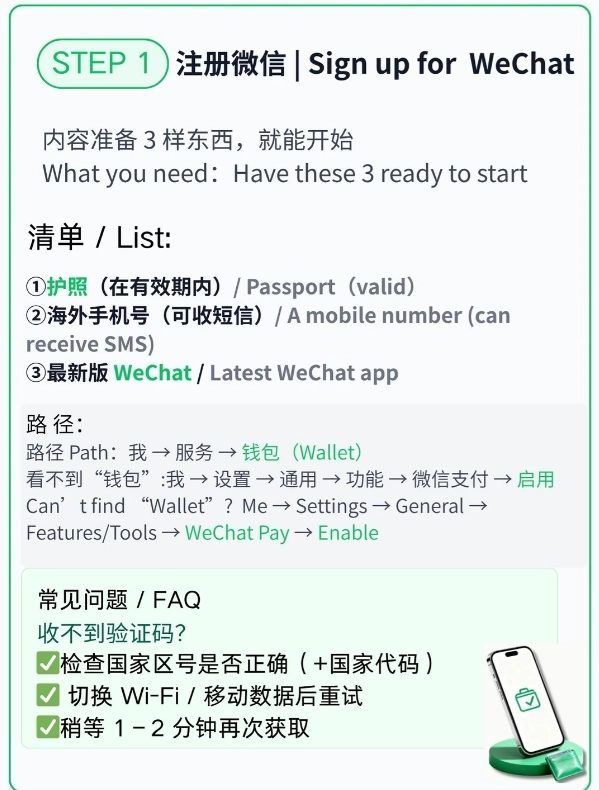
I'll walk you through the exact flow I use when setting up WeChat Pay for my clients. Open your WeChat app, then follow along.
Step 1: Open WeChat Pay Settings
Tap Me → Pay → tap the three dots (右上角) on the top right → Real-name Verification. If you can't find it, search for "实名认证" in the WeChat search bar — that's the Chinese phrase for real-name verification.
Step 2: Choose Passport as ID Type
Select Non-mainland ID card → then choose Passport. Some older versions list "护照" which is passport. Don't pick "港澳台通行证" (permit for HK/Macau/Taiwan) even if you have one — that's for separate documents.
Step 3: Enter Your Passport Details
Fill in your name exactly as it appears on the passport. If your name has a middle name, include it. Birth date format is YYYYMMDD. Passport number: include the letter if it's at the start (like E1234567). Passport expiry: again, YYYYMMDD.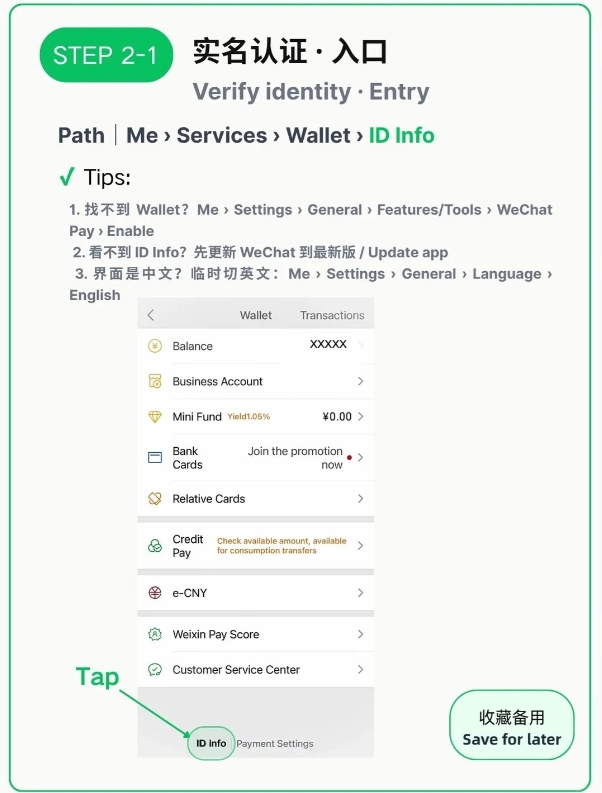
Step 4: Upload a Clear Photo of Your Passport Info Page
Take the photo against a plain background. Avoid direct sunlight or shadows. The entire page must be visible, including the bottom edge and the machine-readable zone (those weird
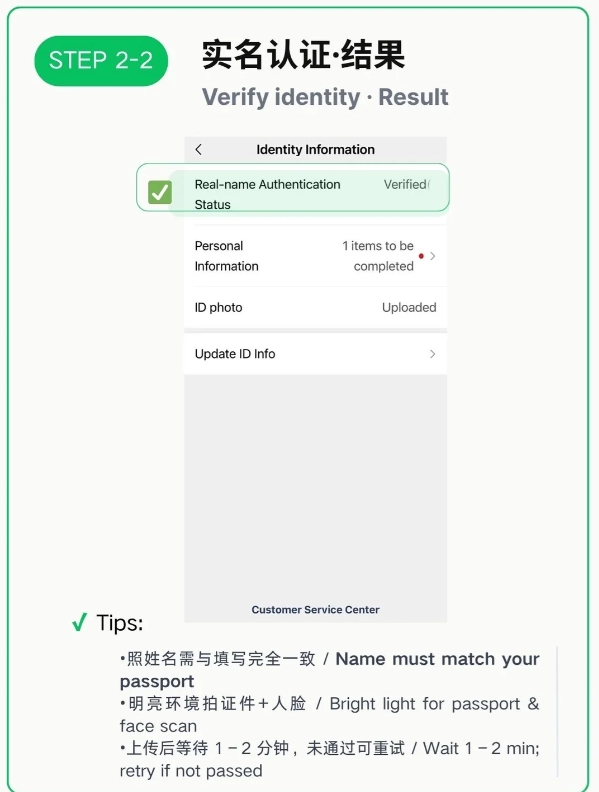
Step 5: Wait for Verification
Most cases get verified instantly (within 2 minutes). Sometimes it says "under manual review" — that can take up to 48 hours, but in my experience it rarely takes more than 4 hours. You'll get a WeChat notification when it's done.
| Step | Common Pitfall | Fix |
|---|---|---|
| 1. Opening settings | Can't find real-name verification | Use the search bar inside WeChat and type "实名认证" |
| 2. Selecting ID type | Choosing "ID card" instead of passport | Make sure you pick "Non-mainland" option first |
| 3. Entering details | Wrong date format or missing middle name | Use YYYYMMDD, enter name exactly as it appears |
| 4. Uploading photo | Photo too small, blurry, or cropped | Use a flat surface, good lighting, and capture the whole page |
| 5. Waiting | Timeout after 60 minutes | If it doesn't verify instantly, keep the app open; don't restart |
5 Mistakes I See Tourists Make Every Week
These are the things that cause verification failures or delays. Learn from others' frustration:
- Using a phone number from a restricted country. WeChat blocks certain number ranges. If your phone number doesn't work, ask a friend with a Chinese SIM to help you register a new WeChat account.
- Uploading a photo of your passport cover. Yes, it's happened. The system needs the page with your photo and details.
- Incorrect name order. Western names might be reversed when entered. Pay attention to the order: given name first, surname last, as in your passport.
- Putting spaces in passport number. Don't include spaces or hyphens. Enter the number as a continuous string. Example: PA1234567.
- Submitting during Chinese public holidays. Manual review times balloon during Spring Festival or National Day. If possible, do it on a regular weekday.
Backup Payment Options (When Verification Fails)
I'm not going to lie — sometimes verification just won't go through. Maybe your passport is expired, or the system bugs out. Here's what I recommend to my groups:
- Alipay (Tourist Version): The Alipay app has a dedicated tourist pass which sometimes requires less strict verification. Download Alipay, choose "Tourist Pass" and link your international card.
- Cash: Many places still accept cash. Carry small denominations (10s and 20s) as taxis often can't change large bills.
- UnionPay Card (from home): If your bank issues UnionPay cards, they work at most POS terminals.
- Ask for help: Your hotel front desk can often top up your WeChat Pay wallet using their Chinese account (for a small fee). Not everyone offers this, but worth asking.
But honestly, WeChat Pay is so ubiquitous that you'll want it working. 95% of my tourists get it done within the first 24 hours in China if they follow the steps above.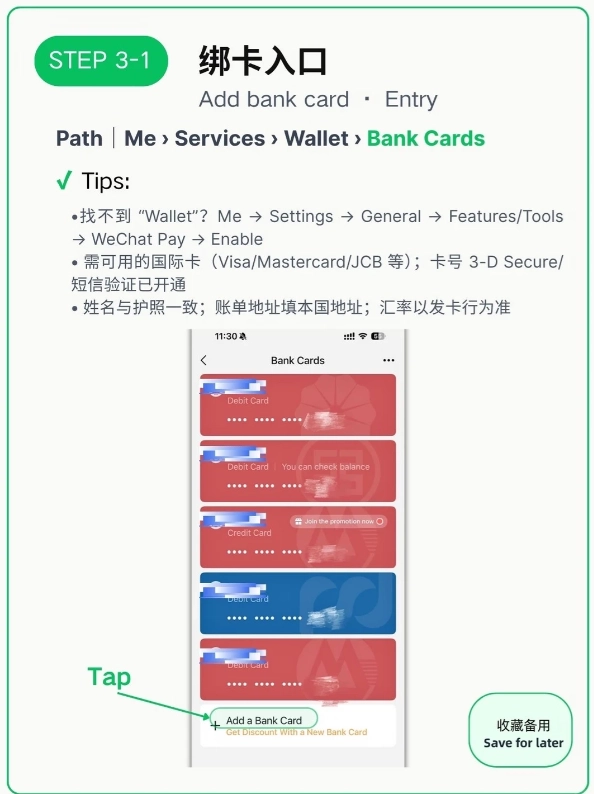
Frequently Asked Questions
Verified and fact-checked by the editorial team. This content has been fact-checked to ensure informational precision.








No comments yet.