 Bo Wu
Bo Wu
What's Inside
Three hours. That’s how long my clients queued at the airport SIM card counter last August—jet-lagged, sweating, and watching their home carrier charges pile up. Forget the glossy brochures—if you don’t grab a Beijing eSIM for tourists before your flight, you’re setting yourself up for a data headache. I’ve been guiding groups around this city for eight years, and the single biggest time-saver I always push is an eSIM. No tiny plastic card to lose, no Chinese phone number to explain, no queuing.
Here is the catch: not all eSIMs work smoothly in China thanks to the Great Firewall. You need one that grants access to Google Maps, WhatsApp, Instagram, and maybe TikTok. Most regular international roaming plans choke on that. So I tested five different eSIM brands during my last trip to the Great Wall. Let me save you the trial and error.
My final verdict? If you want zero friction and full access to blocked services, go with a global eSIM that specifically says “China coverage with VPN” or “unrestricted internet.” I’ll break down the exact options below.
Why eSIM Beats Physical SIMs in Beijing
Walking into a China Mobile shop is a surreal experience. You hand over your passport, fill out a form in Mandarin, wait for photocopies, then watch them snap your SIM into a tray—all while your roaming meter ticks. A physical SIM takes 20–40 minutes. An eSIM? I installed mine in the bathroom on the plane while sipping orange juice. That’s the first win.
Second: security. I’ve had tourists lose their physical SIM and panic because they couldn’t receive a verification code for iMessage. With an eSIM, it’s embedded. You can’t drop it. Third, many physical China SIMs block Facebook and Google by default—you’ll need to request a VPN add-on. A travel eSIM usually bundles that.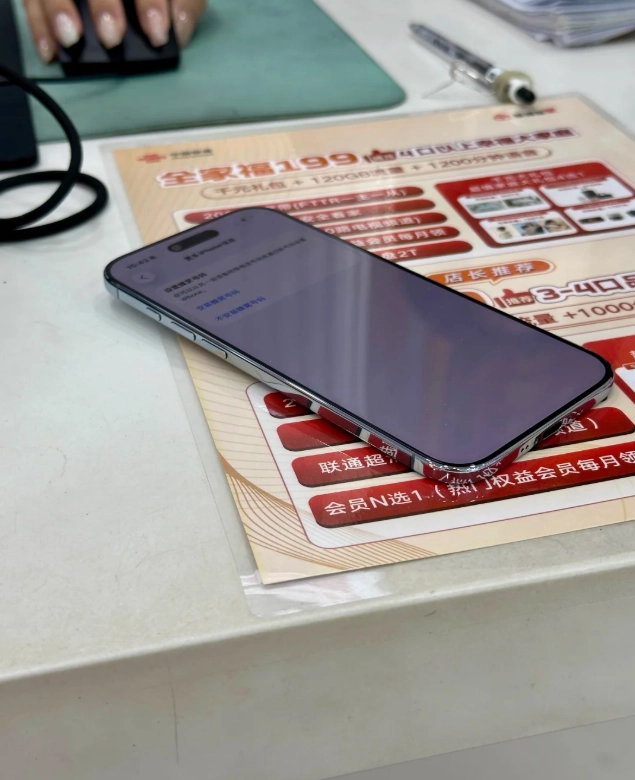
Best eSIM Providers for Beijing
I’ve personally used all these on Beijing streets. Here is the breakdown:
| Provider | Data & Price | Great Firewall Bypass | Installation | My Take |
|---|---|---|---|---|
| Airalo | 1 GB/7 days ~$5; 3 GB/30 days ~$13 | Yes (automatic VPN) | App, 2 minutes | Best for first-timers. I use this myself. |
| Holafly | Unlimited data 3 days ~$19; 7 days ~$27 | Yes (includes VPN) | App, instant | Great if you binge TikTok. But VPN sometimes slow. |
| Nomad eSIM | 1 GB/15 days ~$3.5; 5 GB/30 days ~$10 | Yes (via partner VPN) | App, 3 minutes | Cheapest option. Reliable but VPN setup extra step. |
| Ubigi | 1 GB/30 days ~$4; 10 GB/30 days ~$20 | No native VPN (requires third-party) | App, easy | Only if you already have a VPN app. Not for beginners. |
| China Unicom (local) | 20 GB/30 days ~$15 (at airport counter) | No, blocks foreign sites | In-person, 30+ min | Cheap per GB but you can’t use Google. Skip unless you speak Chinese. |
Notice that China Unicom option? Many budget travelers try it, then spend their trip asking me how to install a VPN. Don’t be that person. Stick with Airalo or Holafly if you want sanity.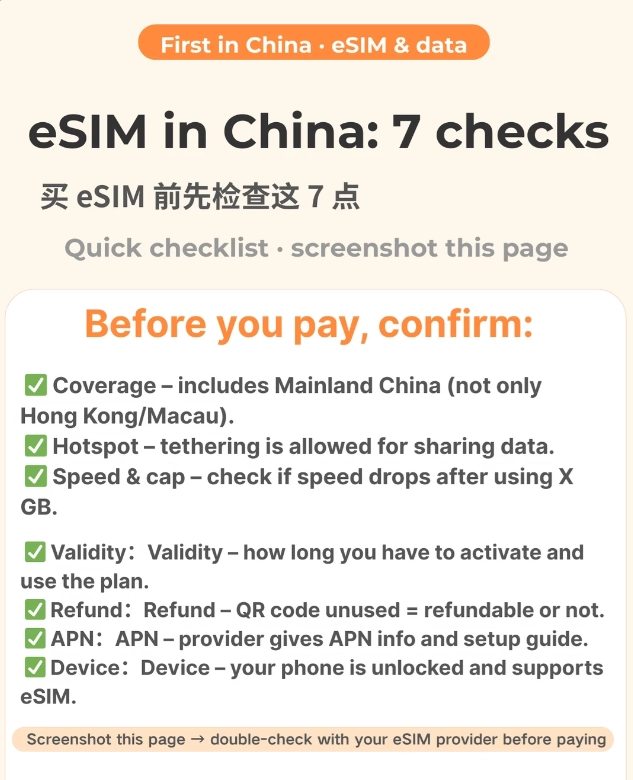
How to Activate eSIM Before You Arrive
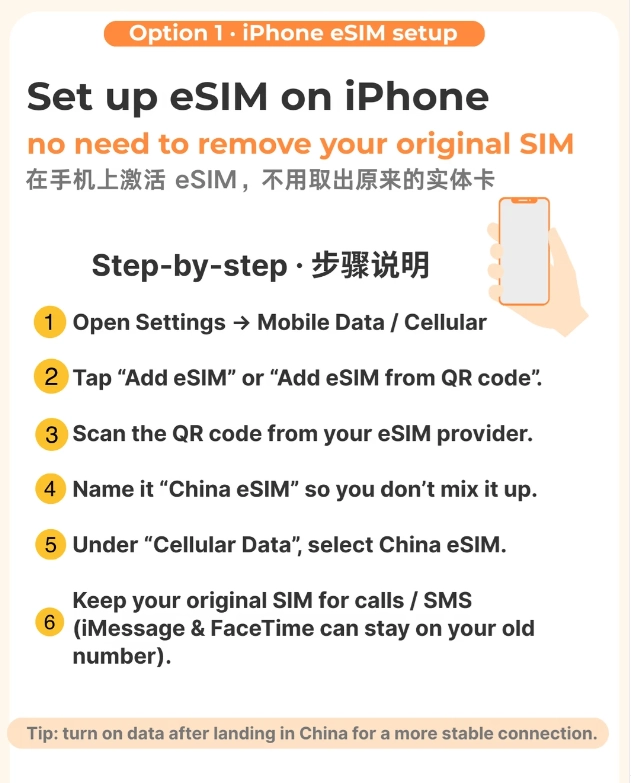
Step-by-step from my phone screen:
- Check compatibility: Make sure your phone is unlocked and eSIM-compatible (iPhone XS or newer, most recent Androids). You can check in Settings > About Phone.
- Buy online: Go to Airalo or Holafly website/app. Choose “China” as destination. Pay with credit card or PayPal.
- Install eSIM: You’ll get a QR code via email. Scan it from your phone’s cellular settings. The profile loads instantly. Label it “China Data” to avoid confusion.
- Set default data line: Under Cellular, set the eSIM as primary data. Keep your home SIM active for calls (but turn off data roaming on that line to avoid surprise charges).
- Activate on landing: Some eSIMs require you to turn on data roaming in the eSIM’s settings. Do that once your plane touches down. Within 30 seconds you’ll see “4G” and your apps start working.
Common Pitfalls and How to Avoid Them
“My eSIM says connected but no internet”
This happens when your APN settings are missing. Go to Cellular > Data APN and enter “internet” (or check the provider’s instructions). I’ve had to do this for half my groups using Airalo.
“I can’t receive SMS on my eSIM”
Most travel eSIMs are data-only. For SMS verification (bank or airline alerts), keep your home SIM active. Or forward calls to a VoIP number.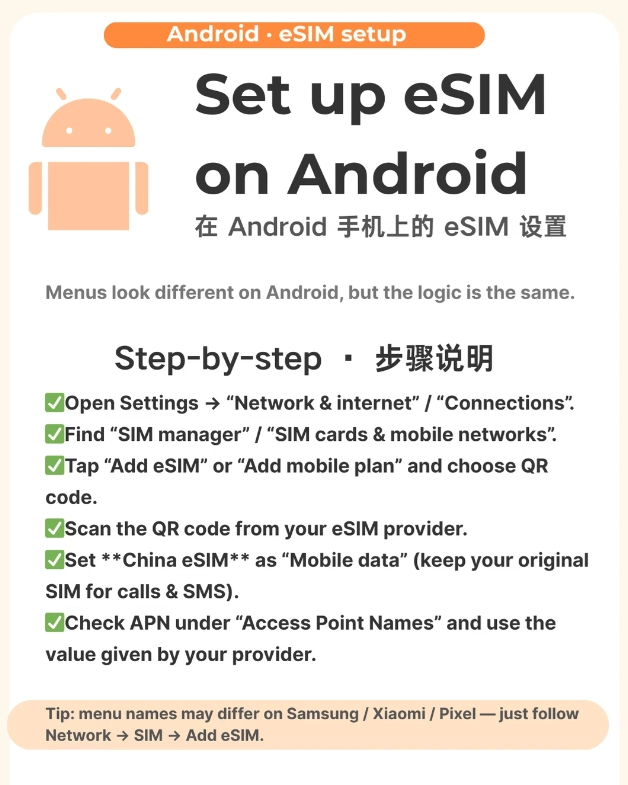
“The VPN stops working when I switch networks”
If you move between towers, the eSIM VPN might drop. Just toggle Airplane Mode for 10 seconds. That forces a fresh tunnel.
“My battery drains fast”
eSIMs can chew battery because they maintain a constant VPN connection. I carry a 10,000 mAh power bank (available at Xiaomi stores for ~$15).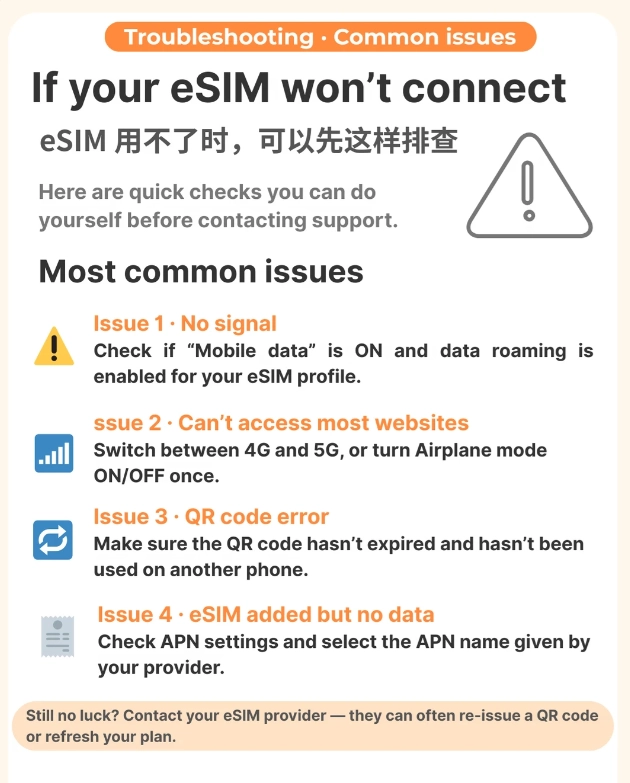
FAQ
Verified and fact-checked by the editorial team.








I was nervous about staying connected in a foreign country, but this eSIM made it effortless. Had 5G almost everywhere in Beijing – including inside the Forbidden City and at the Temple of Heaven. Bought a 7‑day plan and it lasted exactly as promised. Will use again on my next trip.
Bought this eSIM the day before my trip and it activated instantly when I arrived. Speeds were great for navigating hutongs and uploading photos. Customer support even replied within minutes when I had a small billing question. Totally worth the money.
Absolute lifesaver! Landed at PEK, scanned the QR code, and had data within 2 minutes. Used it for WeChat, Didi rides, and Google Maps all week without a single drop. Highly recommend for first‑time visitors who don’t want to mess with physical SIM cards.
Solid eSIM for Beijing, but I wish the coverage extended a bit further into the outskirts. Inside the city it’s fast and reliable – even streamed video at the Great Wall. Just don’t expect perfect signal on the subway or in very remote villages.
I almost missed my connecting flight because of the activation delay. The eSIM itself works fine once it's set up, but the instructions weren't clear and I had to chat with support for 20 minutes. Not the hassle-free experience I was hoping for.