 Tao Xu
Quick Navigation
- Why Booking Is Different for Foreigners
- Step 1: Choose Your Booking Platform
- Step 2: Register an Account (The Painful Part)
- Step 3: Search and Select Trains
- Step 4: Payment – The Biggest Hurdle
- Step 5: Get Your Ticket (E-ticket vs Paper)
- Common Mistakes and How to Avoid Them
- Frequently Asked Questions
Let me tell you a story. Last week, a couple from Germany stood next to me at Guangzhou South Railway Station, sweating and staring at the ticket machines. They had tried to book online for three days. Three days. Their credit card got rejected, the 12306 website kept timing out, and they almost gave up on their China trip entirely. I walked them through it in 15 minutes. That’s when I realized: foreign travelers don’t need another generic guide. They need someone who has done this hundreds of times. Someone who knows the exact WeChat mini-program to use, the precise moment to pay, and the secret to getting your money back if things go wrong. I’ve been guiding groups across China for seven years, and I’ve booked more high-speed train tickets than I can count. Here is the real deal.
Why Booking Is Different for Foreigners
Chinese high-speed trains are a marvel—fast, clean, and on time. But the booking system? It was built for locals, not tourists. The official platform, 12306.cn, is entirely in Chinese, requires a Chinese ID number for full access, and often blocks foreign IPs. Payment is another beast: international credit cards rarely work, and services like PayPal are nonexistent. Popular third-party platforms like Trip.com and Klook simplify things, but they charge fees and have limited cancellation flexibility. I always tell my clients: the cheapest and most reliable method is to use the official 12306 English interface via the app or website, but only if you know the workarounds. Let’s break it down.
Step 1: Choose Your Booking Platform
Here is your menu of options, with the pros and cons based on real experience.
| Platform | Language | Payment Methods | Fees | My Verdict |
|---|---|---|---|---|
| 12306 Official (App/Web) | English option available (partially) | Chinese bank cards, sometimes Visa/MC via Chinese gateway | None (list price) | Best for price, but registration is a headache |
| Trip.com (formerly Ctrip) | Full English | International credit cards, PayPal, Apple Pay | Usually 10-20 RMB per ticket | Easiest for first-timers, accept fees |
| Klook | Full English | International cards, Alipay | Often higher (15-30 RMB) | Good for last-minute, but limited availability |
| WeChat / Alipay mini-programs | Chinese only | WeChat Pay, Alipay | None, if you have local payment | Not recommended for foreigners without local payment |
| At the station counter | Chinese (some English-speaking staff in major stations) | Cash, Chinese bank cards, sometimes Visa/MC | None, but time-consuming | Emergency backup only—queues can be 40+ minutes |
I personally use Trip.com for most of my clients because it saves time and the English experience is smooth. However, if you are on a tight budget and have patience, the 12306 official route is worth mastering.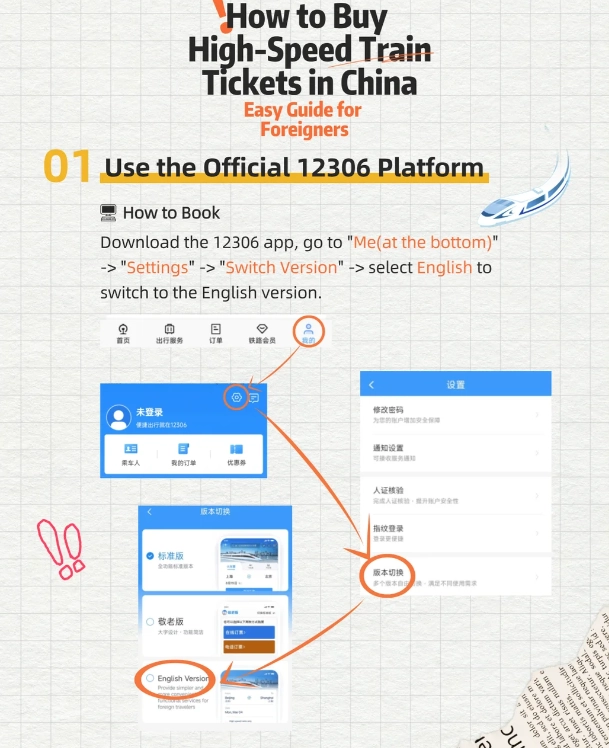
Step 2: Register an Account (The Painful Part)
Okay, this is where most foreigners give up. I get it. Let me walk you through the 12306 registration without wanting to throw your phone.
For Trip.com (Recommended)
Just sign up with your email or Google account. That is it. No passport verification needed for registration, though you’ll need to add passenger details later. Painless.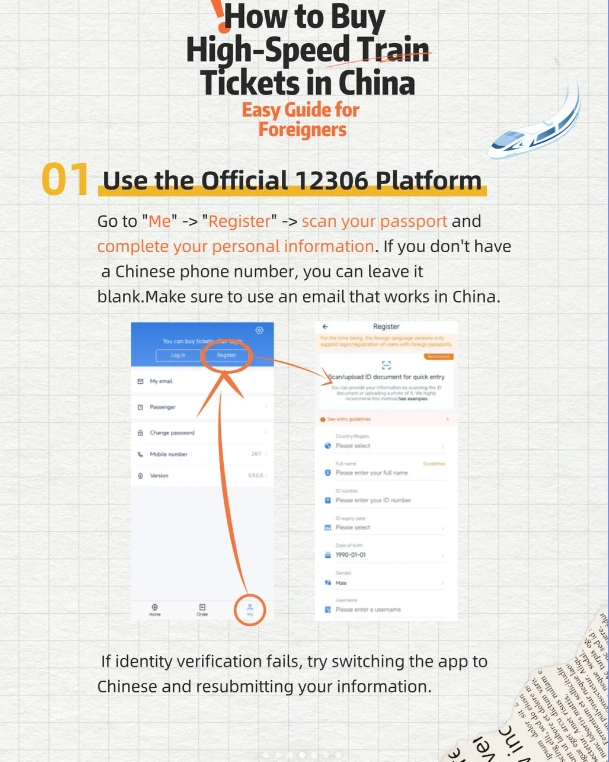
For Official 12306 (The Hard Way)
The official 12306 website (12306.cn) has an English version at 12306.cn/en/. To register, click “Register” on the English page. You will need:
- A valid passport number (the system only recognizes certain passport types; if yours fails, try adding your passport number exactly as on the bio page).
- A Chinese phone number (must be valid for verification code). If you don’t have one, buy a Chinese SIM card at the airport or use a friend’s number temporarily—but you’ll need it later for receiving tickets.
- An email address that hasn’t been used with 12306 before.
Step 3: Search and Select Trains
Once you have an account (on any platform), searching is straightforward. Enter your departure city, arrival city, and date. The system shows all available trains. Pay attention to:
- Train type: G (high-speed), D (bullet), C (intercity). G trains are the fastest, reaching 300 km/h.
- Seat classes: Second class (2 seats per side, affordable), First class (2+2, wider seats), Business class (1+2, lie-flat seats on some trains). For short trips (under 3 hours), second class is fine. For longer journeys, I recommend first class for the extra legroom and power sockets.
- Duration: Highlighted in hours and minutes. Double-check if it includes any transfers—rarely but possible.
- Departure station: Big cities have multiple stations (e.g., Beijing South, Beijing West). Know which one is closest to your hotel.
After selecting a train, you will be asked to add passengers. Enter the full name exactly as on your passport, and the passport number. Trip.com also asks for nationality and date of birth. Double-check everything—a typo can prevent boarding.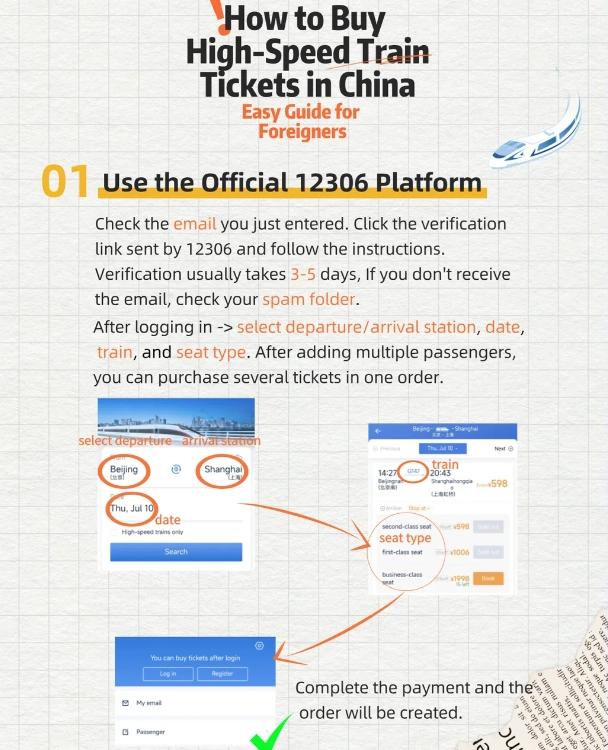
Step 4: Payment – The Biggest Hurdle
Here is the reality: international credit cards (Visa, Mastercard, Amex) work on Trip.com and Klook without issues. On 12306 official, they rarely work for foreigners unless you have a Chinese bank account or Alipay linked to an international card. My trick: use Alipay. If you install Alipay app and connect your international credit card (available for many countries), you can pay directly on 12306 or via the official app. But setting up Alipay may require a Chinese phone number and identity verification—another loop.
For those without Alipay, Trip.com is the safest bet. I once had a client whose Visa was blocked by his bank for a “suspicious transaction” to China. Solution? He used PayPal on Trip.com, and it went through instantly. So always have a backup payment method. Cash is accepted at station counters, but not online.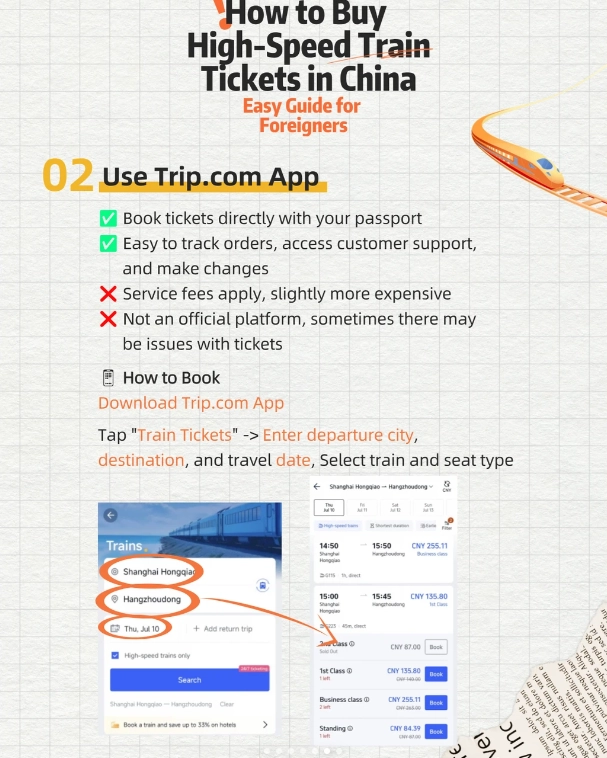
Step 5: Get Your Ticket (E-ticket vs Paper)
Good news: since 2020, China has fully adopted e-tickets for high-speed trains. You do not need a paper ticket unless you specifically request one (e.g., for souvenir). After payment, your booking confirmation is sent via email or SMS. At the station, simply scan your passport at the automatic gates. The gate will open, and you are in.
If you used Trip.com, you can also download the ticket to your phone as a QR code. But passport scan is the standard.
Common Mistakes and How to Avoid Them
After seven years of shepherding tourists onto trains, here are the blunders I see most often:
- Not linking passenger during booking. You must add every traveler separately. One client tried to book four seats under his own name—blocked at the gate.
- Ignoring the 15-minute rule. Gates close 5-15 minutes before departure (varies by station). Do not wander off to buy snacks after you have your ticket. I missed a train once because I stopped for coffee at a station shop 300 meters from the gate. Local security would not let me through.
- Using a different passport number. If you renew your passport, use the old number for booking if the ticket was issued before renewal. Better to cancel and rebook.
- Assuming all stations have English signs. Major stations do, but smaller ones may not. I always download the Chinese names of my departure and arrival stations on my phone screen, just in case.
- Not factoring in platform wait time. Chinese stations are huge. Your gate could be a 15-minute walk from the entrance. Add buffer time.
Frequently Asked Questions
Verified and fact-checked by the editorial team. This content has been fact-checked to ensure informational precision.








Perfect for first-timers. I loved how it broke down the different train classes (G, D, C) and even suggested which routes are scenic. The tip about arriving 30 minutes early because of security checks saved me from missing my train. Exactly what I needed – simple, practical, and no fluff. Would give it 6 stars if I could.
This article is a lifesaver for solo travelers! I'm not tech-savvy at all, but the clear instructions on using Alipay and Trip.com to book tickets without Chinese characters made everything so easy. I even showed it to a couple at the station who were struggling. 5 stars – it really delivers on 'no Chinese needed'.
I had high hopes because of the title, but the article felt a bit outdated. For example, it mentioned paper tickets, but when I tried to book the app already uses e-tickets and face scanning. The core info is still useful, but I ended up missing a train because I followed an old step. Would be great if they updated it.
Used this guide for my Beijing-Shanghai trip and it was flawless. The explanations about seat types, luggage storage, and even how to find your platform were spot on. I felt like a pro navigating Shanghai Hongqiao station. Saved me so much time and stress. Highly recommend for anyone who doesn't want to deal with language barriers.
Honestly, this article saved my trip. I was so nervous about booking high-speed trains in China without speaking any Chinese, but the step-by-step screenshots made it idiot-proof. The only reason I'm giving 4 stars instead of 5 is that the article didn't cover the '12306 app verification' issue for foreigners – I had to Google that separately. Still, a solid resource.