.jpeg) Mike Sun
Mike Sun
Quick Navigation
Two hours. That's how long my client from Australia waited at the Bund ticket booth last week—cash only, no English signage, and the ATM ten minutes away. I've been guiding in Shanghai for eight years, and I've seen too many travelers waste precious time because they didn't set up WeChat Pay before arriving. Forget the glossy travel brochures—if you don't have WeChat Pay working on your phone, you're going to struggle.
Let me save you that frustration. Here's exactly how to get WeChat Pay Shanghai-ready, where it works, and the tricks most guides never mention.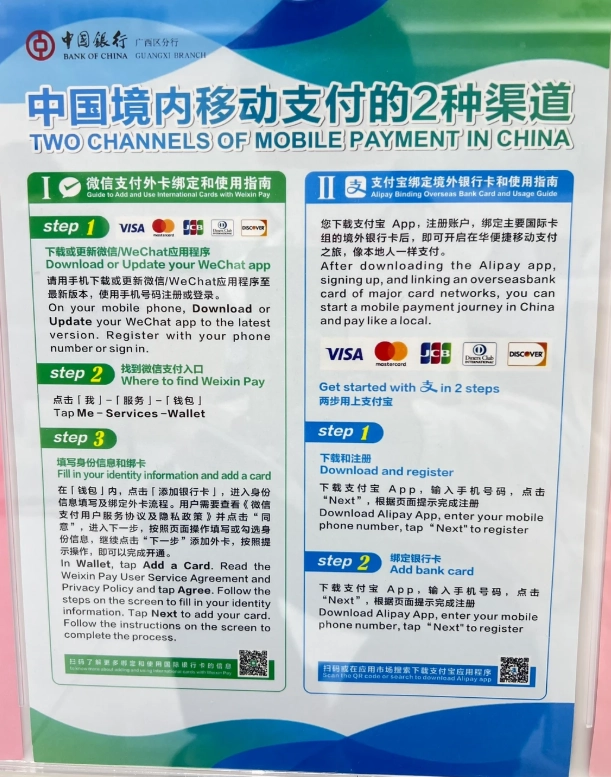
Why You Need WeChat Pay in Shanghai
Shanghai is practically cashless. Even street food vendors, tiny noodle shops, and taxi drivers prefer scanning a QR code over handling bills. I've seen tourists turned away from popular restaurants because they only had cash. WeChat Pay is accepted everywhere—from luxury boutiques on Nanjing Road to the metro ticket machines. Without it, you'll constantly be hunting for ATMs or asking strangers to help you pay.
How to Set Up WeChat Pay for Your Shanghai Trip
Step 1: Download and Register WeChat
Download WeChat from your app store. Register with your foreign phone number (any country works). You'll receive an SMS code. Don't worry about a Chinese number—you can use your own.
Step 2: Add a Payment Method
Open WeChat → Tap "Me" → "WeChat Pay" → "Wallet" → "Cards" → "Add a Card". Supported international cards include Visa, Mastercard, JCB, and Diners Club (currently limited to these). Enter your card details. You'll need to verify with a 3D Secure code from your bank.
Step 3: Verify Your Identity
To unlock higher transaction limits and larger payments, you must verify your identity using your passport. Go to WeChat Pay → "Real-name Authentication". Photograph your passport data page and take a selfie. Verification usually takes 1–2 business days. Without it, you're limited to small payments (around 3,000 RMB total).
Where to Use WeChat Pay in Shanghai
- Metro & Buses: Use WeChat's "Metro Card" mini-program to scan QR codes at turnstiles. Works at all 18 metro lines. Avoid buying single-trip tickets.
- Taxis & Ride-Hailing: Didi (China's Uber) accepts WeChat Pay directly. Just show your QR code to the driver after the ride.
- Restaurants: Nearly every eatery has a QR code on the table. Scan, enter the amount, and pay. Some old-school dumpling shops still prefer cash—always carry 100–200 RMB as backup.
- Attractions: The Bund observation deck, Shanghai Disneyland, and the Oriental Pearl Tower all accept WeChat Pay at entrance kiosks.
Common Pitfalls and How to Avoid Them
I've made these mistakes myself, and I've seen clients struggle:
- International card decline: Not all merchants accept international cards via WeChat Pay. Try to maintain a balance by asking a local friend to send you money, or use a top-up service (like using a tourist card from Trip.com).
- Refund troubles: If you return an item, the refund goes to your WeChat balance, not back to your card. To withdraw, you'd need a Chinese bank account. My advice: treat your WeChat balance as spending money.
- Network issues: WeChat Pay requires internet. If you don't have a local SIM, you can use VPN Wi-Fi at hotels, but always keep a backup SIM for emergencies.
WeChat Pay vs Alipay vs Cash: Which One for Shanghai?
| Feature | WeChat Pay | Alipay | Cash |
|---|---|---|---|
| Setup ease | Medium (needs international card verification) | Similar, but Tour Pass option available | None needed |
| Where accepted | Almost everywhere | Almost everywhere (slightly more in smaller shops) | Declining, many places refuse |
| International card support | Visa, MC, JCB, Diners | Same plus Amex | N/A |
| Refund to card | No (only to WeChat balance) | No (only to Alipay balance) | Immediate |
| Language barrier | Interface mostly Chinese, but tap icons are intuitive | Has English mode (WeChat still Chinese in many places) | Universal |
Bottom line: Use WeChat Pay as primary, Alipay as backup (if you have both), and always keep 200 RMB in cash for emergencies.
Insider Tips from a Local Guide
After years of guiding, here are hacks I share only with my private clients:
- Pre-load your WeChat balance before arrival: Ask your hotel concierge or a Chinese friend to send you a red packet. 500 RMB is enough to start.
- Save a screenshot of your payment QR code: If your phone dies or screen cracks, a printed copy works at some shops.
- Use the "Quick Pay" mini-program: It generates a barcode that merchants can scan directly—no need to open your wallet.
- Avoid using WeChat Pay at bars that display a personal QR code: That goes to an individual, not the business. Use Alipay or cash for safety.









Perfect for a first-time visitor like me. I followed the instructions while sitting in my hotel lobby and had WeChat Pay up and running in under 15 minutes. Used it at a noodle shop right after. The guide’s language is simple and reassuring. Absolutely needed if you’re coming to Shanghai.
As someone who’s been living here for a month, I wish I had found this guide sooner. It’s super practical – even included tips on how to avoid the “you need a mainland China ID” error. Made my life so much easier. Five stars!
Absolutely brilliant! This guide walked me through every single step from downloading to making my first payment at a local fruit stand. The screenshots were crisp and the warnings about common mistakes saved me from getting stuck. Highly recommend for any newcomer to Shanghai.
Good overall guide. The step-by-step layout was clear, though I wish it mentioned the need for a Chinese bank card early on. Saved me some confusion after I already started. Still, helpful for navigating the app.
I was hoping this guide would make setting up WeChat Pay a breeze, but I struggled with the identity verification part. The screenshots were a bit blurry and the translation wasn’t consistent. Got it working eventually, but it took longer than expected.